45
Description of part function
1. GPS function
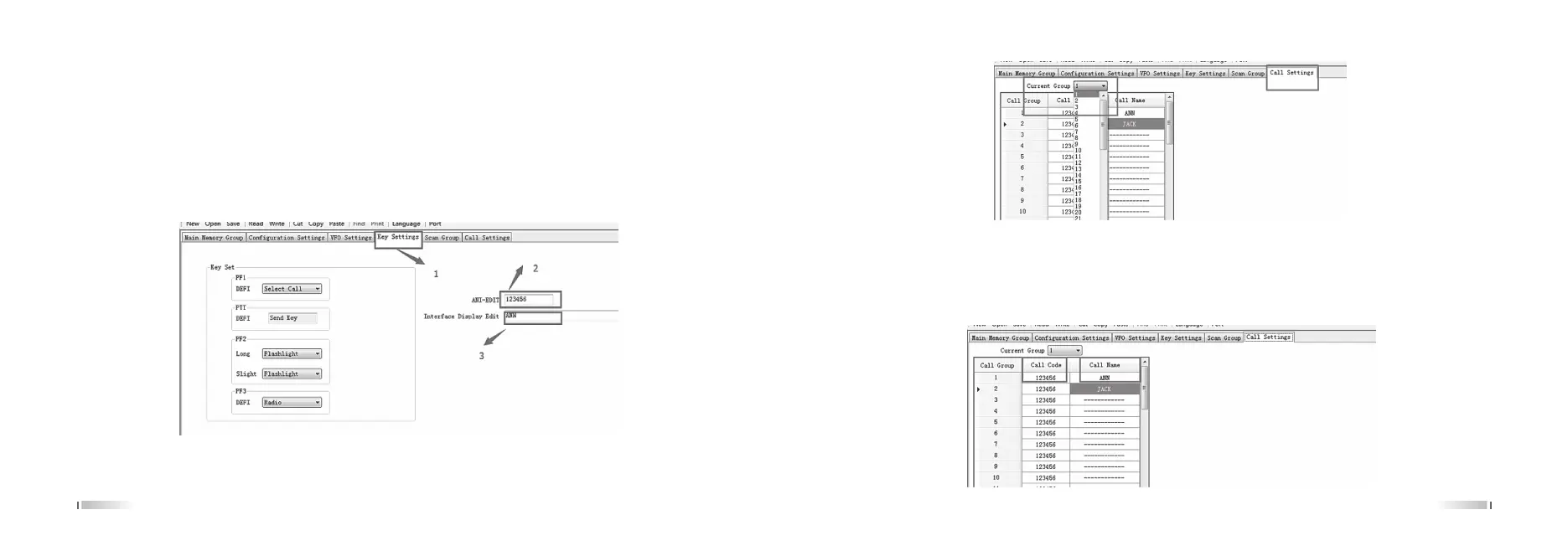
1. Open the programming software, the walkie talkie to read the data, ① select the “side key settings". The "ANI
code" is set to a maximum of 6 digits of the Arabia number (note: The ANI code of the transceiver must be the
same as the call code). ③ The "display interface editor" into English or Arabia digital up to 14 words. (note: that the
contents of the display interface editing as far as possible with the name of the call code to facilitate identification.)
① Select the "select call settings", the "current call group" set to (in a group of all walkie talkie) unified in a group
(such as the election of the 1 groups).
46
Set the "call code" to a Arabia number of up to 12 words per radio identity code. Set the "call name" to 10 digits in
English or Arabia and can be set to a maximum of 5 characters (note:as much as possible with the "display
interface editor" content. )
② After the completion of the proposed edit file name to save the data, and then write the data to the transceiver.



 To Next Page