47
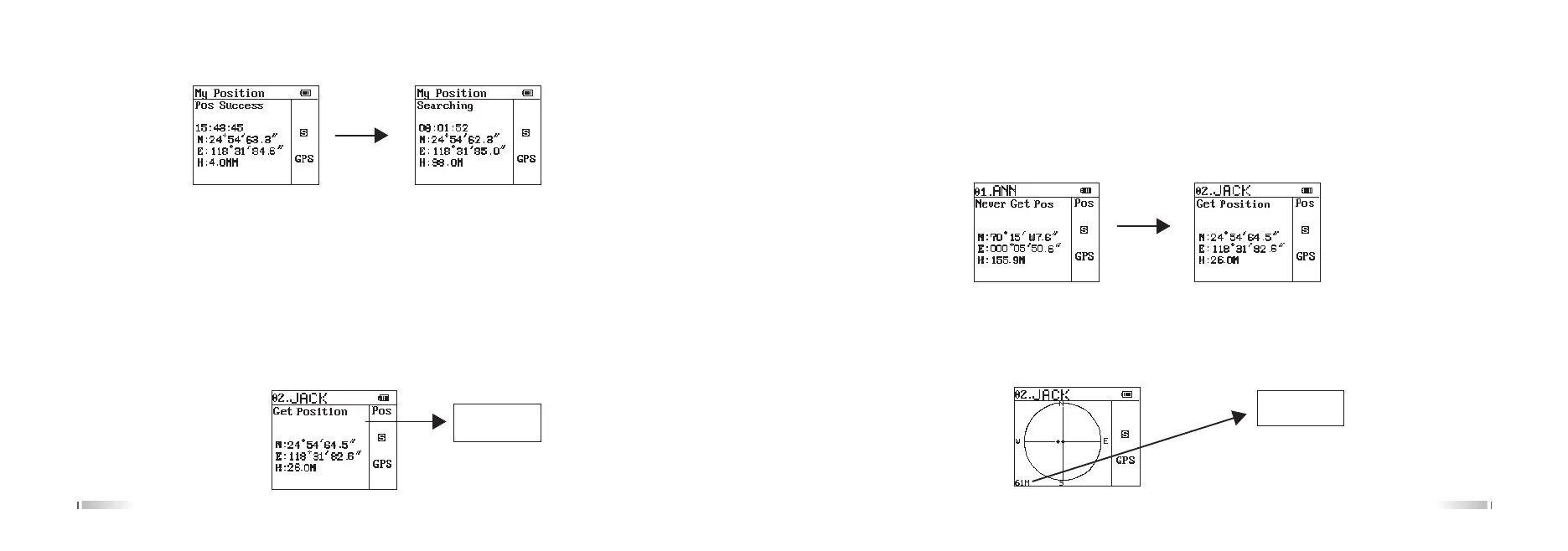
2. GPS self positioning: quick opening and closing can press the keyboard GPS key.
Press GPS to enter the GPS state (to be installed on the Interphone Antenna), place the walkie talkie in an open
space or receive a better location for a better signal for GPS positioning, usually about 30 seconds can do work.
If the time exceeds the successful positioning, more, please consider is a poor signal, change the location, or
consulting professionals. If the information said to get the machine position, then display the current time, latitude
and altitude, which N said north latitude, S said E said south latitude, east longitude, W west longitude, altitude H.
3.
Take the initiative to launch its position: GPS positioning is successful, the side button 1 (orange side key) default
to send location information, can be directly by side key 1 to send the location information (Note: send location
information to confirm each other or multiple receiver walkie talkie "main" frequency " and “sub-frequency” frequency
is consistent with their own it may receive relevant information.)
The other successful
receipt is displayed
[Get Position]
48
4. Get location: In GPS mode, press the [Up] key or the [Down] key to select the key you want to get the location
of the person, at this time the LCD is displayed on the other side of the group and the name. After confirmation,
press the PTT request both parties share the location, after the end of the launch, keep the walkie talkie in a state
of acceptance. After the other part receiving the information, LCD display from the "not get location" to "get location",
then the LCD will display his location information.
At this point, you can press (A/B) key to switch to the distance from the interface, the other side of the specific
location and distance with you (for the middle point of your own, dot flashing point for each other's position, the
lower left corner of your distance.)
It is the distance
between you and
the other



 To Next Page