11/6/2012 14 Retsch GmbH 0002
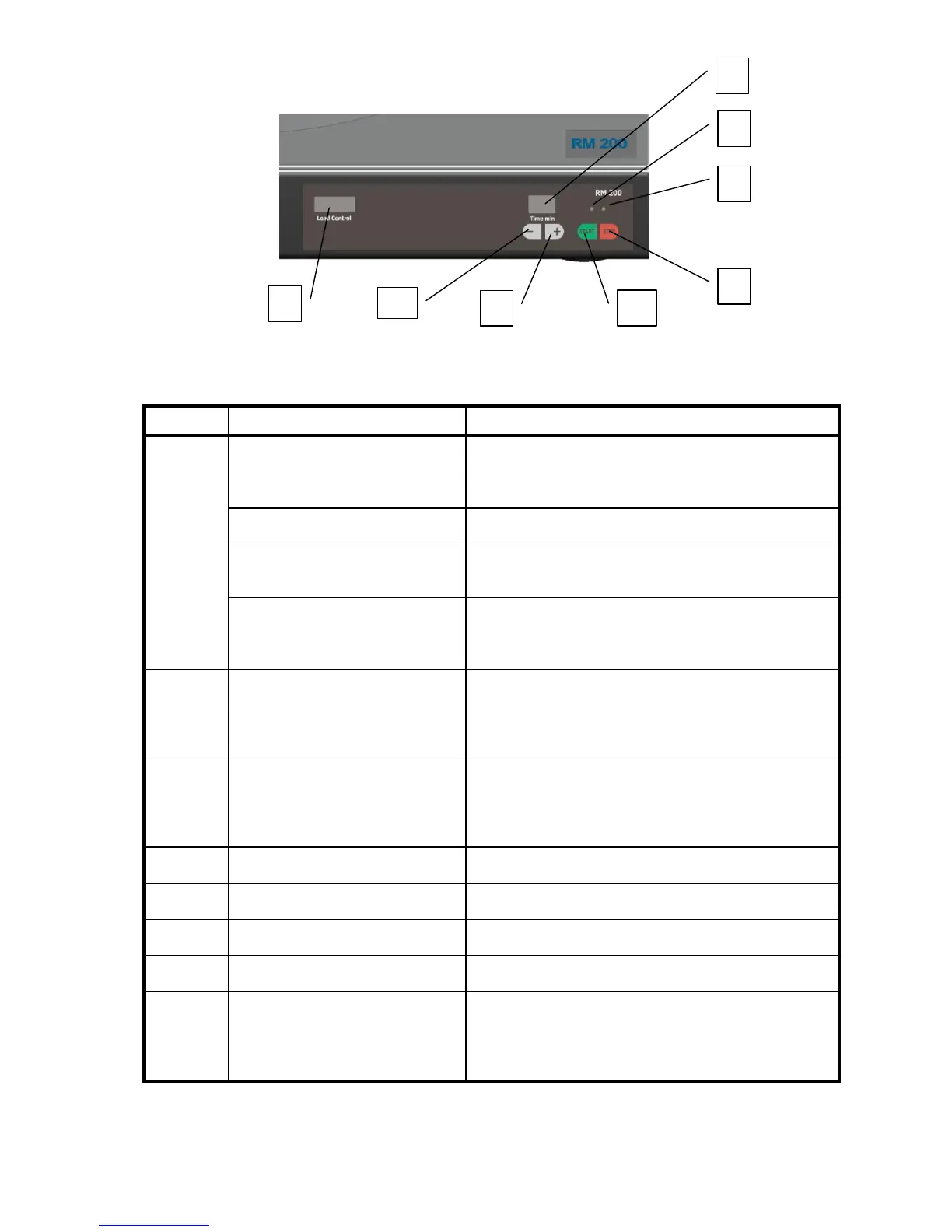
Display and operating unit E
Load Control – load indicator
Shows the actual load of the drive motor. Helps
the user to avoid overloading and overload
circuit breaking.
Display = 1 to 4 green LEDs
Display = 4 green + 1 yellow
LED
Slight overloading. Increasing the load can cause
circuit breaking.
Display =
4 green + 1 yellow + 1 red
LED
Overloading! Continuous overloading with the
red display switches off the control of the drive.
In the adjusting mode and operating mode:
decrease in the adjusted milling time by one
minute. Continuous pressing switches off fast
running.
In the adjusting mode and operating mode:
increase in the adjusted milling time by one
minute. Continuous pressing causes fast
running.
Starts the milling operation
Interrupts or ends the milling operation
Indicates milling operation
Indicates the set milling time or, during
operation, the milling time still remaining.
Setting range: 1 to 99 minutes plus “- -“ for
continuous operation.


 To Next Page