7
Installation
No special tools are required to install the DVR. Refer to the installation manuals for the other items that make
up part of your system.
Your DVR can be used with either NTSC or PAL equipment.
NOTE: You cannot mix NTSC and PAL equipment. For example you cannot use a PAL camera and an
NTSC monitor.
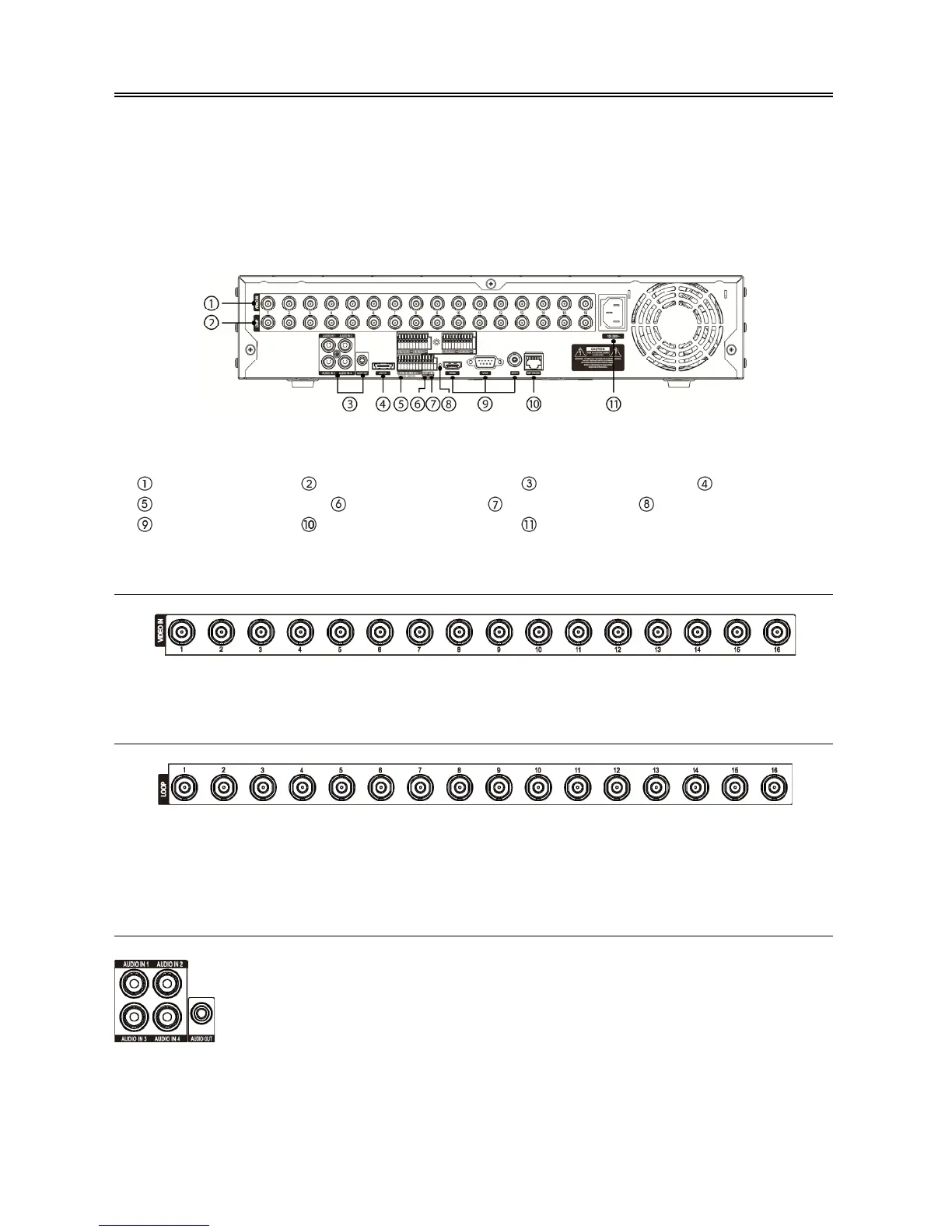
< 16-Channel DVR rear panel >
Video Input Video Loop Through Audio In/Out eSATA Port
Alarm Input/Output RS485 Port RS232 Port Factory Reset Switch
Video Out Network Port Power Cord Connector
Video Input
Connect the coaxial cables from the video sources to the BNC Video In connectors.
Video Loop Through
If you would like to connect your video source to another device, you can use the Loop BNC connectors.
NOTE: The Loop BNC connectors are auto terminated. Do NOT connect a cable to the Loop BNC unless it
is connected to a terminated device because it will cause poor quality video.
Audio In/Out
NOTE: It is the user’s responsibility to determine if local laws and regulations permit recording audio.
The DVR does not have amplified audio output, so you will need a speaker with an amplifier. The
DVR does not have a pre-amplifier for audio input, so the audio input should be from an amplified
source, not directly from a microphone.
Your DVR can record audio from up to four sources. If supported, connect the audio
sources to Audio In 1, Audio In 2, Audio In 3 and Audio In 4 as needed using RCA
jacks. Connect Audio Out to your amplifier.



 To Next Page