CAMERA CONNECTIONS
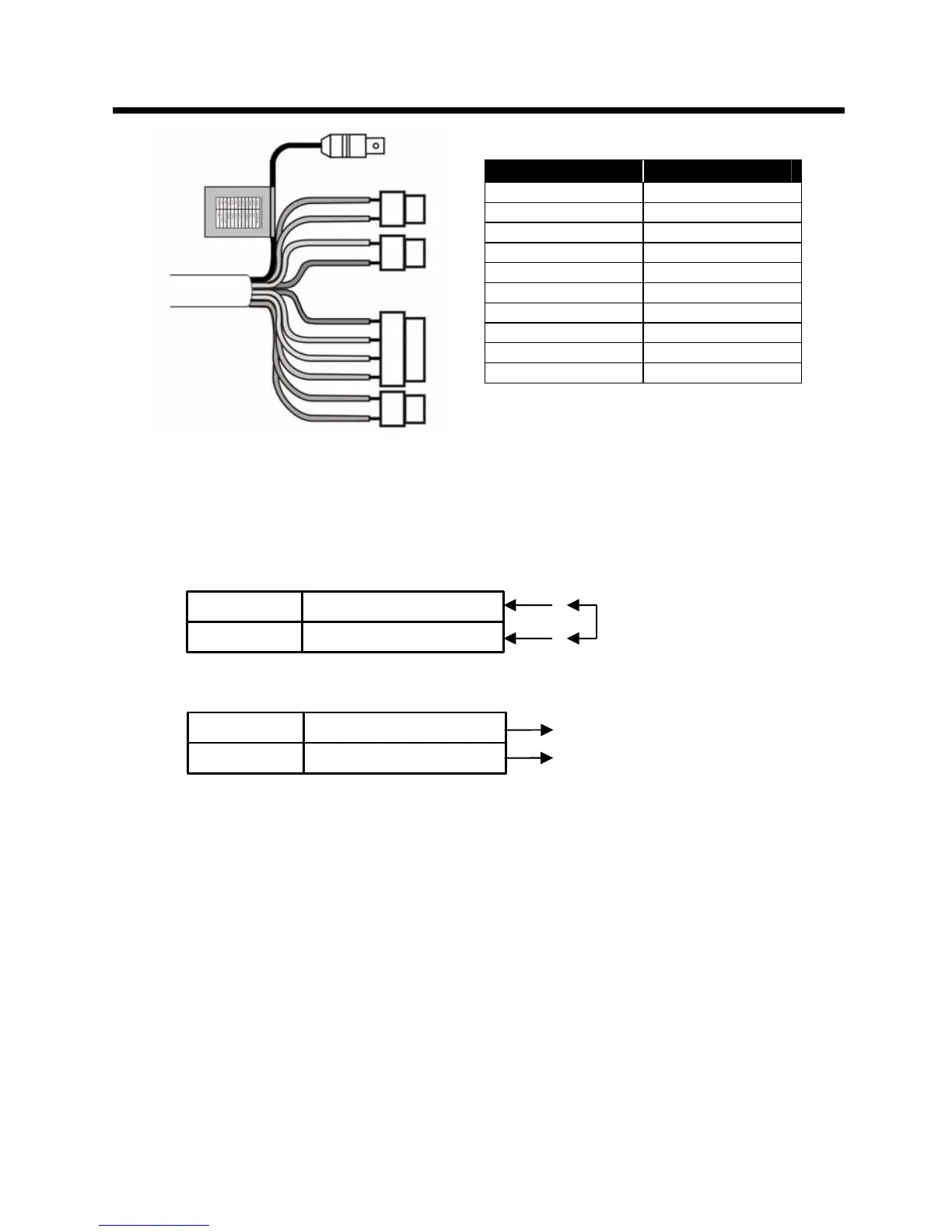
Connection Cable Description
COLOR Description
RED AC24V/DC12V
WHITE AC24V/DC12V
BLUE RS485(-)
GREEN RS485(+)
YELLOW ALARM OUT
GRAY DN EXT-IN
BLACK&WHITE DN EXT-OUT
BLACK GND
SKY BLUE UTP+(Option)
PINK UTP- (Option)
1) External Day/Night Control
Select Day/Night mode using external equipment, by connecting control lines to the
appropriate terminals.
DAY&NIGHT EXTERNAL INPUT
Switches the cameras D/N mode to either Day or Night based on the input
status. Refer to the diagram below. The cameras D/N mode must be set to
EXT for this to function.
DAY&NIGHT OUTPUT
– Open Collector (5V/10mA)
The camera turns on an external IR LED Lamp by detecting the sensitivity on the AGC
level when the D&N mode is set "AUTO" on the OSD menu of the camera.
DAY&NIGHT INPUT Gray
GND
Black
●
●
Open contact: DAY
Close contact: NIGHT
‘
2) Alarm Out
– Open Collector (5V/10mA)
Motion detection signals are output through this port. (YELLOW AND GND)
Active state is configurable.
3) Power Input Terminal
RED & WHITE : These terminals accept 24VAC or 12 VDC. When using 12VDC
it is recommended to use a DC power supply that can support an inrush current
of 0.55A
4) Camera Control
GREEN : RS 485+
BLUE : RS 485-
5) UTP (Option)
Video signal through out the UTP Cable (SKY BLUE(+) & PINK(-))
GNDBlack
Black&White
DAY&NIGHT OUTPUT
● 5V/10mA : IR LED ON (NIGHT)
● 0V : IR LED OFF (DAY)
9


 To Next Page