- 10 -
system. The Revolabs HD Control Panel can operate with either a locked or unlocked Executive HD
Base Station. When the HD Control panel is connected to an unlocked Executive HD Base Station,
the Gold features will then appear on the screen and be controllable by the user. All features
mentioned below with a ‗*‘ after them are only part of the HD Gold Control Panel.
Configuration Settings
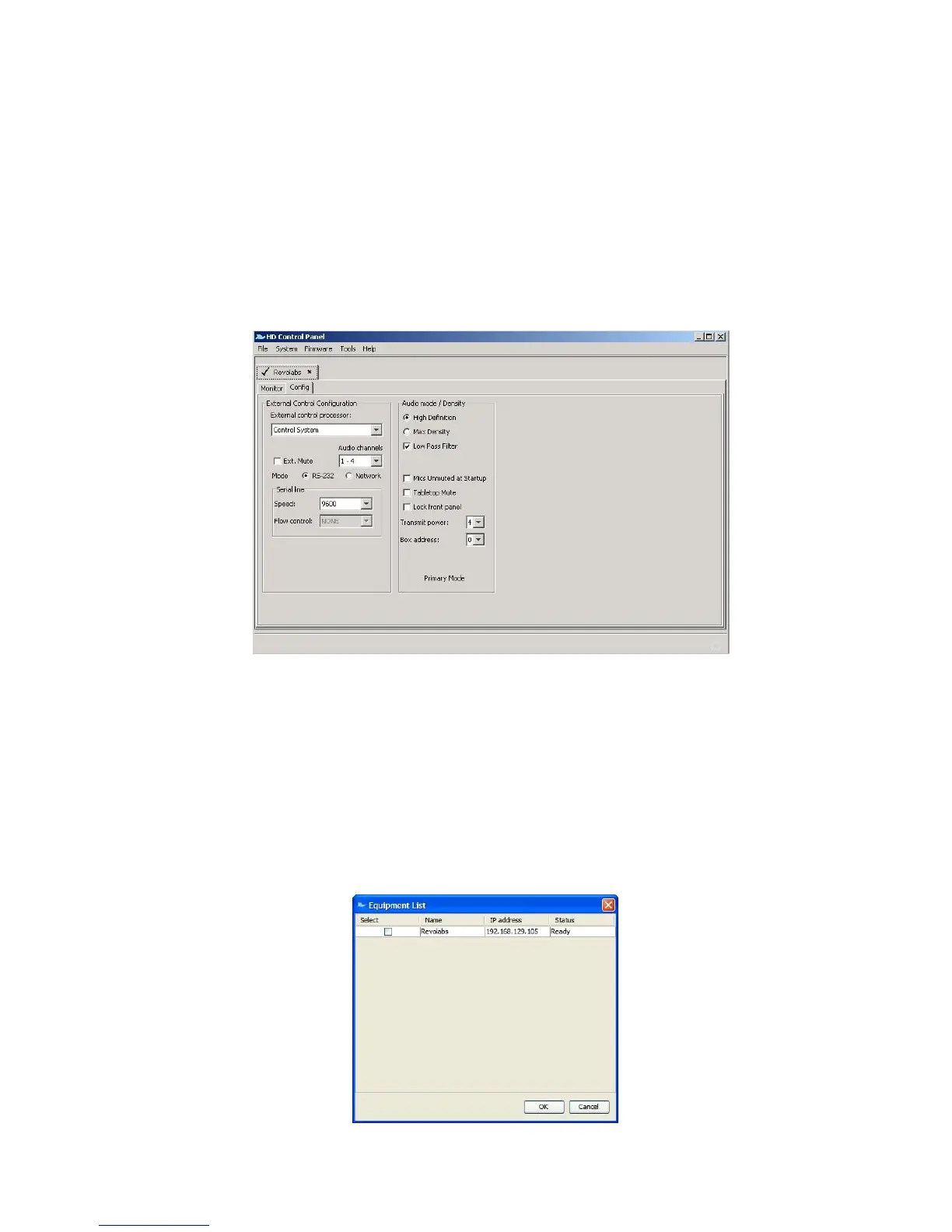
The Revolabs HD Control Panel controls all of the Executive HD Base Station configuration settings.
Some, but not all, of the configuration settings can also be controlled from the Base Station front
panel display. All configuration settings are located either in the ‗Config‘ tab of the device window or
on the HD Control Panel menus.
File – Record Events:
The ‗Record Events‘ option of the ‗File‘ menu will record the activity of the Base Station and
microphone chipsets. This file can only be read by Revolabs technical support. This feature should
not be used without the recommendation and support of a Revolabs engineer.
System - Scan Network:
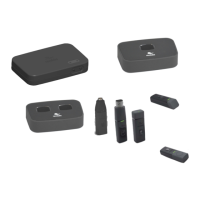
The ‗Scan Network‘ option of the ‗System‘ menu will search the connected Ethernet network for all
connected HD Base Stations. A pop-up ‗Equipment List‘ will show all discovered devices and allow
the connection to the selected Base Station(s). Once connected to a Base Station, the HD Control
Panel will open a device tab for each Base Station.


 To Next Page