EasyManua.ls Logo

Revopoint INSPIRE 3D SCANNER - Page 8

Default Icon
47 pages
Print Icon
To Next Page IconTo Next Page
To Previous Page IconTo Previous Page
Loading...
INSPIRE 
C

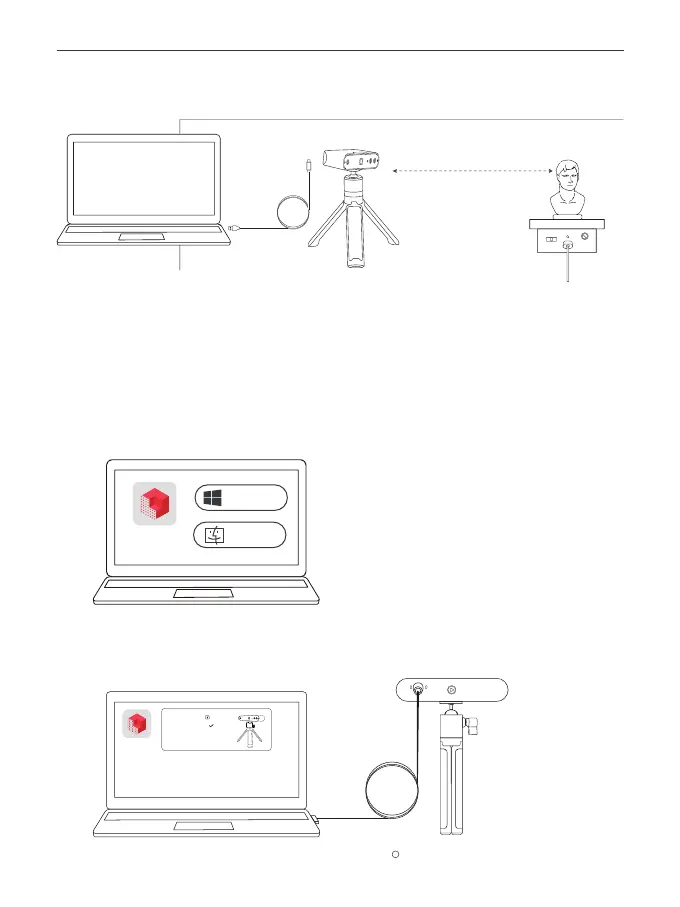
3. Set Up the Scanning Environment
4. Download Revo Scan 5
5. Open the Software to Start 3D Scanning
Distance of about
25 cm





Revo Scan 5
Windows
macOS
www.revopoint3d.com/download/
Download it at
Revo Scan 5
New Project
Scanner Connected
Name: INSPIRE
Connection Type: USB
Settings

Other manuals for Revopoint INSPIRE 3D SCANNER

Related product manuals