13. TROUBLESHOOTING
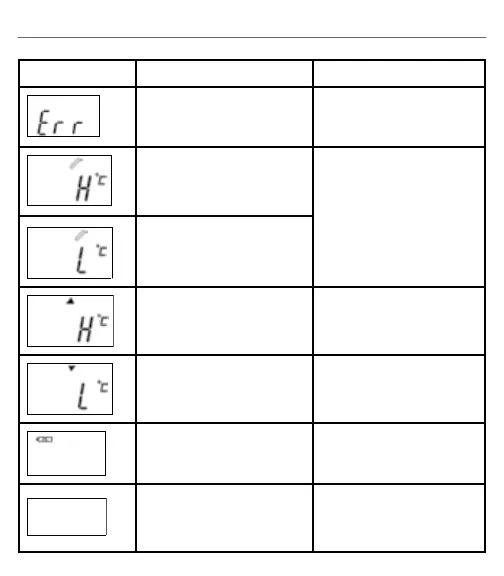
Error Message Problem Solution
The system is not functioning
properly.
Unload the battery, wait for 1
minute and repower it.
Temperature taken is higher
than 100.0°C/212.0°F in the ear
mode or 42.2°C/108.0°F in the
forehead mode.
Temperature taken is lower
than 0°C/32.0°F in the ear
mode or 34.0°C/93.2°F in the
forehead mode.
Ambient temperature is higher
than 40.0°C/104.0°F.
Ambient temperature is lower
than 16.0°C/60.8°F.
Please check if the steady
battery icon is the only symbol
shown on the display.
Battery should be replaced
immediately.
Please check if the battery has
been loaded correctly.
Reinstall the battery. Check
the polarity of the battery.


 To Next Page