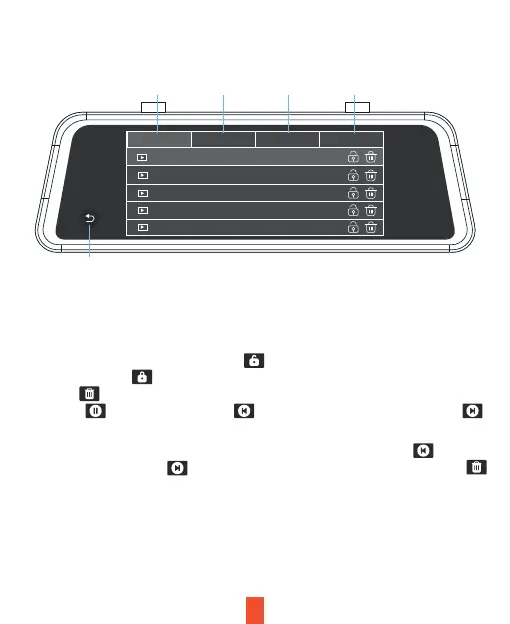
Key Functions
1. Front camera video file
2. Rear camera video file
V. Playback Mode (File Explorer)
IMAGEVIDEO-F VIDEO-B VIDEO-LOCK
2022112513560123_f.mov
2022112513560123_f.mov
2022112513550823_f.mov
2022112513544623_f.mov
2022112513455223_f.mov
1
2 3 4
5
Locked files will not be overwritten by loop recording. When there are too many
locked files or the Locked files full message is prompted, please backup the files and
delete them from the device.
Note:
Enter the file list interface and touch the icon to lock a video file. For a locked video
file, touch the icon to unlock the file. For unwanted video and picture files, touch
the icon to delete the file. To play a video file, touch the file name. During playback,
touch the icon to pause it. Touch to scroll up the files and touch the icon
to scroll down the files.
For an image file, touch the file name to enter the full screen view. Touch to scroll
up the files and touch the icon to scroll down the file. On the file list page touch
to delete a file.
23
3. Locked video file
4. Image files
5. Return to home



 To Next Page