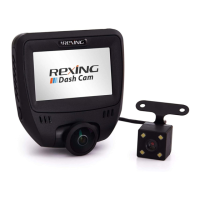
The Rexing V5 Plus is a dash cam designed to record video while driving, offering a range of features for enhanced safety and convenience. It comes with a main dash cam unit, a rear camera with an extension cable, an in-car power cable, a 3M adhesive mount, a USB cable, a cable management tool, a quick start guide, and a safety guide.
Function Description:
The primary function of the Rexing V5 Plus is to capture video footage from multiple perspectives (front, rear, and cabin) while the vehicle is in operation. This can be crucial for insurance purposes, accident reconstruction, or simply recording scenic drives. The device automatically starts recording when it receives power, typically when the car is started, and saves the footage to a Micro SD card. It supports continuous loop recording, ensuring that older, non-locked footage is overwritten to make space for new recordings. The dash cam also includes an Emergency Record Mode (EMR) which allows users to manually record and lock a 20-second video clip in case of an incident. An integrated G-sensor can detect sudden impacts or movements, automatically locking the current recording to prevent it from being overwritten. The GPS Logger feature records the vehicle's speed and location, which can be reviewed later using a dedicated GPS Video player on a computer. For extended surveillance, the Parking Monitor function, when connected to a Smart Hardwire Kit (sold separately), enables the dash cam to record even when the vehicle is parked. The device also has Wi-Fi connectivity, allowing users to connect to a mobile app for live preview, recording control, and viewing/saving captures.
Usage Features:
The Rexing V5 Plus is designed for straightforward installation and operation.
- Installation: The dash cam is mounted onto the windshield using a 3M adhesive mount. It's important to properly orient the mount and allow sufficient time for the adhesive to set before attaching the camera. The rear camera is also mounted as shown in the manual and connected to the main unit via an extension cable. Power is supplied through an in-car power cable plugged into a 12V DC power outlet or cigarette lighter.
- Power On/Off: The device automatically powers on when connected to a power source and the vehicle is started. It will also automatically start recording. To manually turn on the device, the Power button can be pressed and held.
- Recording: Video recording begins automatically when the device is powered on. The LED lights and a red dot on the screen blink to indicate active recording. Recording can be stopped by pressing the OK button.
- Menu Navigation: The device features several buttons for navigation: Power/Screen Toggle, Menu/Mode, Up Navigation/Emergency Lock, Down Navigation, and OK (Confirm)/Record. The MENU button is used to access settings. Pressing it once enters the settings menu for the current mode, while pressing it twice enters the System Settings.
- Formatting the Memory Card: Before initial use or when using a new memory card, it is crucial to format the card within the camera to ensure proper recording. This is done through the System Setup Menu. Users are advised to back up any important data before formatting.
- Video Playback: Videos can be played back directly on the device by toggling to Playback mode and using the navigation buttons. For computer playback, the memory card can be inserted into an SD card adapter, or the device can be connected directly to the computer via a USB cable. Videos are typically stored in the \CARDV\MOVIE directory on the device's drive.
- Emergency Record Mode (EMR): Holding the Up Navigation button manually triggers a 20-second emergency recording, which is automatically saved and locked. These recordings can be viewed by pressing the menu/playback button.
- Taking Photos: To take a photo, video recording must be stopped, and the MENU button held down. Photos can be viewed in Playback Mode, and deleted individually or all at once through the menu options.
- Wi-Fi Connect: The Rexing Connect app (available on App Store and Google Play Store) allows users to connect their smartphone to the dash cam via Wi-Fi. This enables real-time video streaming, control over recording, and the ability to view and save captured footage on the mobile device. The app is accessed by holding down the OK button on the dash cam, and connection is established by finding the dash cam's SSID in phone Wi-Fi settings and entering the default password.
- GPS Logger: The GPS function automatically activates when connected to a power source and a signal is found. The screen icon changes from red to green to indicate an active GPS signal. Speed units can be configured in the System Settings.
- Parking Monitor: This feature provides surveillance when the vehicle is parked. It requires a separate Smart Hardwire Kit for continuous power supply.
Maintenance Features:
While the manual doesn't explicitly detail extensive maintenance features, it provides guidance for optimal performance and longevity:
- Memory Card Management: The device supports Micro SD cards up to 256GB (Class 10/UHS-1 or higher). Users are instructed to power down the device before inserting or removing the memory card to prevent data corruption or damage. Regular formatting of the memory card is recommended to ensure proper function and prevent recording errors.
- Firmware Updates: Although not explicitly mentioned as a user-initiated feature, dash cams often receive firmware updates to improve performance, add features, or fix bugs. Users should periodically check the manufacturer's website for such updates.
- Cleaning: While not detailed, general care for electronic devices, such as keeping the lens clean and free from dust or smudges, would contribute to clear video quality.
- Support and Warranty: Rexing offers a 12-month warranty, extendable to 18 months upon product registration. Customer support is available via email and phone for any questions or issues, indicating a commitment to product maintenance and user assistance. The company also encourages user feedback for continuous product improvement.

 Need help?
 General

 To Next Page