The Rexing V360 is a high-quality digital dashboard camera designed for in-vehicle recording, offering advanced features and robust construction. It records video using Rexing's high standards of design and technological expertise, ensuring reliable performance and detailed footage. The device is equipped with a 360-degree wide-angle lens, allowing for comprehensive coverage of the vehicle's surroundings.
Function Description:
The V360 automatically powers on and begins recording when it receives a charge, typically when the vehicle starts. It can also be manually powered on by pressing and holding the POWER button. The camera continuously records video in 1, 2, or 5-minute segments, a feature known as Loop Recording. When the memory card reaches its storage limit, new recordings automatically overwrite the oldest ones. However, "locked" video files are protected from being overwritten. The device supports both front and rear camera recording, with the rear camera image being horizontally flippable to mirror a rear-view mirror perspective.
The V360 includes a G-sensor, which automatically locks the current recording when a sudden change in gravitational force occurs, such as during a vehicular accident. These locked videos are stored separately and are not erased by loop recording or general formatting, unless explicitly chosen. Audio recording can be enabled or disabled, and the device features an internal high-sensitivity microphone and speaker.
For display control, the POWER button can toggle the built-in display on or off to reduce power consumption while recording continues. A screen saver feature allows users to specify the duration for which the display stays on after interaction, or it can be disabled to keep the display constantly active.
Important Technical Specifications:
- Image Sensor: SC3033
- Lens: 360-degree wide-angle lens
- Display: 3-inch screen
- Audio I/O: Internal high-sensitivity mic and speaker
- External Memory: Class 10 or higher Micro SD card (up to 256GB)
- Gravity Sensor: Low / Medium / High / Off settings
- Shutter: Electronics
- White Balance: Auto
- Exposure: Auto ISO
- Battery: 400mAh 3.7V rechargeable lithium-ion battery
- Video Format: h.264 (.MOV)
- Video Resolution: 1440x1440
- Languages: English, Chinese, French, Spanish, Portuguese, German, Italian, Russian, Japanese
- Loop Recording: 1 min / 2 min / 5 min options
- Screen Saver: 1 min / 2 min / Off options
- Audio Recording: On / Off
Usage Features:
- Installation: The camera mounts to the windshield using a 3M adhesive mount. It's recommended to wait at least 20 minutes after applying the mount before attaching the dash cam. The power cable is routed around the windscreen and connected to a 12V DC power outlet via the included car charger. The rear camera connects to the front camera using a provided cable and is mounted as shown in the manual.
- Memory Card: The V360 accepts "High-endurance" Micro SD memory cards (class 10 or higher) up to 256GB. It's crucial to use compatible cards to prevent damage or data corruption. The manual provides instructions for proper insertion and removal.
- Formatting: Memory cards should be formatted using the camera's Format function for optimal performance. This process clears all video files and installs playback software for PC. Users are advised to back up important data before formatting, as locked videos will also be cleared.
- Video Playback: Recordings can be played back directly on the device or on a computer using an SD card adapter and the provided "VeseeSetup" playback software. On-device playback allows toggling between front videos, rear videos, and photos, as well as changing the screen display mode.
- Photo Taking: The device can take photos, which can be viewed and managed similarly to videos.
- Settings: The device offers various settings accessible through the menu, including language, sound volume, date and time, and factory reset options. System settings also display firmware information.
- Auto Start: When enabled, the camera automatically begins recording as soon as it is powered on.
- Mirror Function: Horizontally flips the rear camera image to provide a mirrored perspective, useful for viewing through the rear-view mirror.
Maintenance Features:
- Power Management: The internal battery is primarily for emergency file saving and supports up to 15 minutes of disconnected operation. The camera should always be connected to a power source while recording. If the battery is depleted, it requires at least 5 minutes of charging before the device will turn on. Only Rexing-approved chargers and cables should be used to prevent damage or battery explosion.
- Data Backup: Users are advised to regularly back up important data from the memory card, especially before formatting.
- Firmware Updates: The device displays its current firmware version, suggesting that updates may be available to improve performance or add features. Users should refer to the Rexing website for the latest manual and support information.
- Warranty and Support: The Rexing V360 comes with a 12-month warranty, extendable to 18 months upon product registration on the Rexing website. Customer support is available via email and phone for product-related questions and assistance. Rexing emphasizes its commitment to improving products and welcomes constructive feedback.
The V360 is designed for ease of use and reliability, providing drivers with a comprehensive recording solution for their vehicles.

 Need help?
 General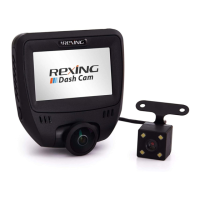

 To Next Page











