card at: \video. Locked videos can be identified on the memory card as
the ones with “_SOS” appended to the end of the file name.
Note: Locked video files will not be erased by Loop Recording.
Locked files will remain on the memory card until they are manually
deleted, or when the card is formatted.
MODE SETUP
6.1 VIDEO MODE SETTINGS
2019-02 -1 6 1 4: 52 :5 9
Setting
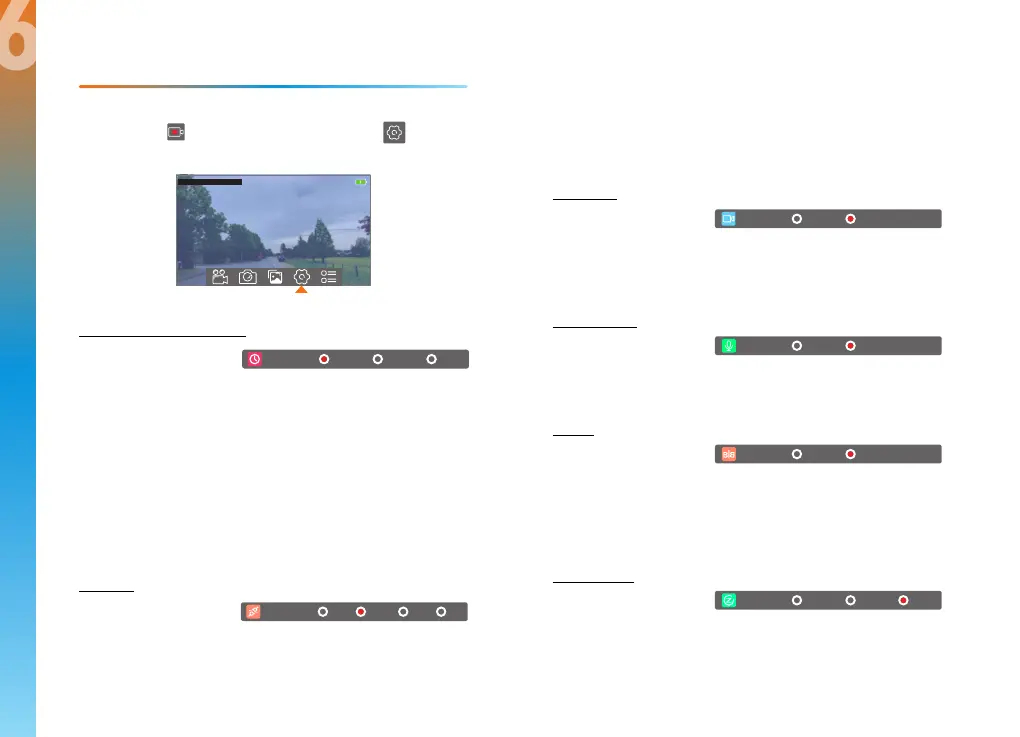
Loop Vid (Loop Recording)
Default setting: 1 Minute
Video will be continually recorded in 1, 2, or 5-minute segments.
When the storage limit is reached on the memory card, new
recordings will automatically overwrite the oldest recordings. Locked
video files on the memory card will remain protected, and will
not be overwritten by Loop Recording.
Note: Turning Loop Recording off would require you to manually
clear recordings from your memory card whenever storage is full, thus
we highly recommend keeping Loop Recording enabled.
G-sensor
Default setting: Medium
Select this setting to initiate an automatic file lock on the current
recording when a change in gravitation force occurs, such as in a
vehicular accident. Note: Locked videos are located on the memory
Auto Start
Default setting: On
When enabled, the camera will begin recording as soon as it is
powered.
Record Audio
Default setting: On
Allows you to enable or disable audio recording with your videos.
Mirror
Default setting: On
Horizontally flips the image of the rear camera to present a mirrored
perspective similar to using the rear-view mirror to look behind
your vehicle.
Screen Saver
Default setting: Off
Specifies the duration for which the display will stay on after the
device was powered on or last interacted with. Having this setting
disabled (default) will keep the display on constantly, though you
may manually toggle the display by pressing the POWER button.
Loop V id
1 min 2 min
5 min
G-sensor
Low Med
High
off
Auto S tart Off On
Off On
Audio
Off On
Mirror
1 min 2 min
off
Screen
2322
6
In Video Recording Mode, you must first stop recording, which is done
by tapping the Video Recording icon. Press the Settings
icon to open Video Settings.
5


 To Next Page