Need help?
Do you have a question about the Rexing V33 Plus and is the answer not in the manual?
Shows the physical layout of the dash camera and its components.
Details the functions of each button on the dash camera.
Explains the meaning of various icons displayed on the camera screen.
Instructions for mounting the dash cam, inserting memory, and connecting power.
Explains how the camera automatically starts and stops recording when powered on.
Instructions for viewing and managing recorded videos on the device.
Detailed steps for playing back recordings using the camera's interface.
Guides on transferring and viewing videos on a computer.
How to view GPS data alongside video recordings using specialized software.
Steps to connect the dash cam to a mobile device via Wi-Fi for live view and downloads.
Details on using the parking surveillance and motion detection features with hardwire kits.
Configuration options for video resolution, loop recording, and WDR.
How to manually adjust camera exposure for better image brightness or darkness.
Option to enable or disable audio recording with video clips.
Settings for the G-sensor to detect impacts and lock video files.
Adjusts the automatic infrared light for low-light conditions.
Option to automatically adjust time for daylight saving periods.
Feature to create time-lapse videos after the car is turned off.
How to enable and manage the dash cam's Wi-Fi feature.
Configures the display timeout duration to save power.
Process to format the memory card, erasing all data.
Sets the timer for capturing still photos.
Adjusts the quality level of captured images, affecting file size and detail.
Enhances image clarity for a more distinct picture.
Adjusts camera sensitivity to light for photos, impacting noise levels.
Adjusts color temperature for different lighting conditions.
Step-by-step guide to update the dash cam's firmware safely.
Details the camera's image sensor and lens specifications.
Covers the dash cam's warranty period and extension options.
Contact information and methods for product support and inquiries.
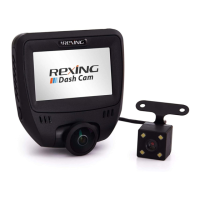
The Rexing V33 Plus is a high-quality digital recording device designed for in-vehicle use, functioning as a dash camera system. It offers comprehensive video surveillance for your vehicle, both while driving and when parked. The device is designed with ease of use and reliability in mind, providing features that enhance driving safety and security.
The primary function of the Rexing V33 Plus is to record video footage from multiple camera perspectives: front, cabin, and rear. It automatically starts recording when powered on, typically when the vehicle's engine starts, and stops recording when power is disconnected. This automatic operation ensures that important driving footage is captured without manual intervention. The device supports continuous loop recording, which means it records video in segments and automatically overwrites the oldest recordings when the memory card is full. This ensures that the camera always has space to record new footage. However, locked video files are protected from being overwritten, preserving crucial events.
The V33 Plus also includes a Photo Mode, allowing users to capture still images. It features a G-Sensor that detects significant or sudden movements, such as impacts or collisions. When triggered, the G-Sensor automatically locks the current video file, preventing it from being deleted by loop recording. This is a critical feature for documenting accidents or incidents.
For enhanced surveillance when the vehicle is parked, the device offers a Parking Monitor function with two options: Vibration Detection and Motion Detection. These features require connection to a Rexing Smart Hardwire Kit (sold separately) to provide continuous power and protect the car battery from discharge. With Vibration Detection, the dash cam switches to parking mode when the engine turns off and starts recording an event if a significant vibration is detected. Motion Detection powers up the dash cam and starts recording when motion is detected in its field of view.
The device integrates GPS functionality, allowing it to acquire and display GPS signals, which can be used to record speed and location information alongside video footage. This data can be viewed using specialized GPS Playback software on a computer.
Wi-Fi connectivity is another key feature, enabling users to connect their mobile devices to the dash cam. Through the Rexing Connect app, users can access live view, and view or download recordings directly to their phone, providing convenient access to footage without needing to remove the memory card.
The Rexing V33 Plus is designed for straightforward operation. Installation involves mounting the front dash cam on the windshield, routing the power cable, and connecting it to the vehicle's 12V power outlet. The rear camera is also mounted and connected to the main unit via an extension cable.
Inserting and removing the Micro SD memory card (up to 256GB, Class 10 or higher) is a simple process, with clear instructions provided to ensure proper handling and prevent data corruption. The device emphasizes the importance of formatting the memory card regularly, especially after transferring files or updating firmware, to maintain optimal performance. Formatting can be done directly through the camera's menu.
The device's interface includes several buttons for navigation and control:
The LCD display shows various status icons indicating recording status, memory card insertion, exposure, GPS signal, audio recording, video mode, playback mode, photo mode, and loop recording status, providing real-time feedback to the user.
Video settings allow users to adjust resolution, loop recording duration, Wide Dynamic Range (WDR), and exposure. Audio recording can be enabled or disabled, and a date stamp can be applied to videos. For still photos, settings include capture mode (with timer options), resolution, quality, ISO sensitivity, sharpness, white balance, and color effects.
The device also offers system settings such as beep sound control, language selection, date/time adjustment, auto power off duration, screen saver settings, and firmware version display. Time zone settings allow the device to automatically update the time.
Playback of recorded videos can be done directly on the device, with options to browse, play, fast forward, and rewind. Users can also delete selected or all recordings from the device. For more detailed analysis, videos can be played back on a computer using recommended media players or the specialized GPS Playback software, which displays speed and location information.
Regular maintenance is crucial for the optimal performance and longevity of the Rexing V33 Plus. The manual strongly recommends formatting the memory card regularly, ideally once a month or after transferring files to a computer. This helps prevent data corruption and ensures smooth operation of the loop recording function. The device provides a clear formatting procedure through its setup menu.
Firmware updates are available to address issues or improve device functionality. The manual provides detailed instructions on how to update the firmware, emphasizing the importance of using the correct firmware for the specific camera model and formatting the memory card after the update. Incorrect firmware or failure to format can lead to malfunctions.
The device is designed to be robust, but users are cautioned against using incompatible memory cards or unapproved chargers and cables, as these can damage the device or corrupt data and void the warranty. In case of an unstable power supply, users are advised to contact customer care.
The Parking Monitor feature, while beneficial, comes with a maintenance note: if not using the parking mode, the Gravity Sensing sensitivity should be set to low to prevent the memory card from filling up with locked videos, which can hinder normal recording. Similarly, when using Motion Detection, ensure Parking Mode is turned off on the dash cam to avoid malfunctions.
The Rexing V33 Plus is backed by a 12-month warranty, extendable to 18 months upon product registration, and offers customer support for any questions or issues, ensuring users have resources for assistance and maintenance.
 General
| Field of View | 170 degrees |
|---|---|
| Wi-Fi | Yes |
| Loop Recording | Yes |
| G-Sensor | Yes |
| Parking Monitor/Mode | Yes |
| Battery | Supercapacitor |
| Video Resolution | 4K Ultra HD (3840 x 2160) |
| Storage | Supports up to 256GB MicroSD card (Class 10 or higher) |
| GPS | Yes |
| Image Sensor | Sony Sensor |


 To Next Page