109
USB charging mode
HD
16:00:14
57.6G
PID: 000001 DSJ-D1: 000001
2020/03/02 16:20:52
16:00:14
57.6G
PID: 000001 DSJ-D1: 000001
HD
00:00:04
57.6G
2020/03/02 16:20:52
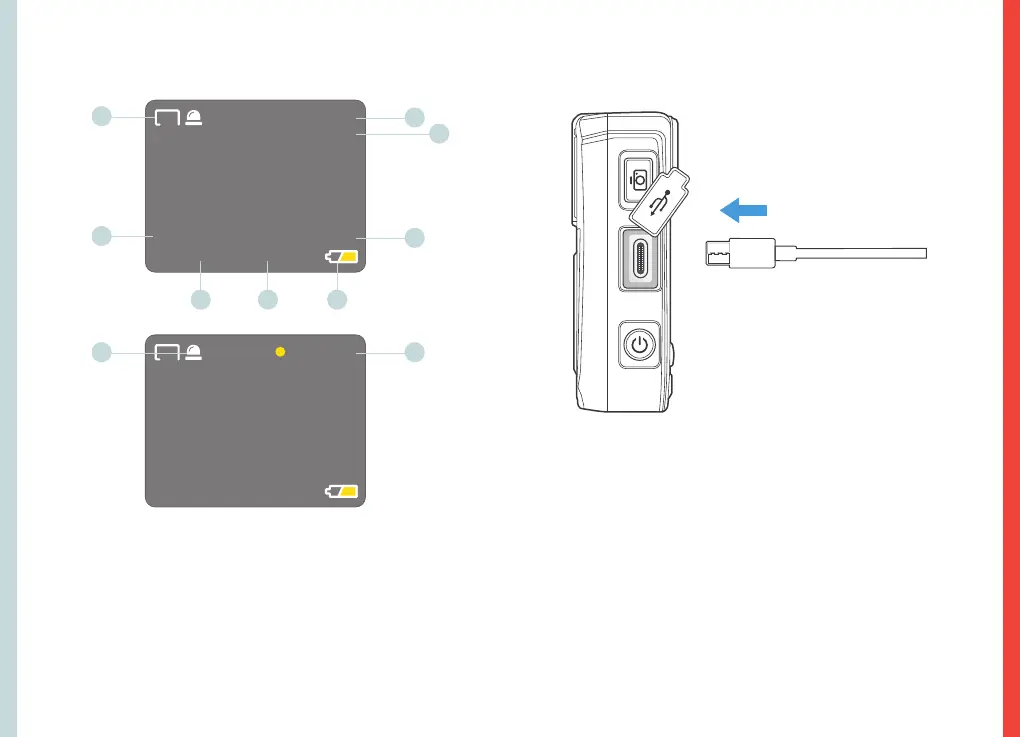
3.LCD Screen Indications
1
2
5
3
4
9
6 7 8
10
1. Video Shoot Resolution
2. Memory Time Remaining
3. Available Memory Space
4. Police ID Number
5. Device ID Number
6. System Date
7. System Clock
8. Battery Level Icon
9. IR Light Indicator
10. Current Video Duration
4. Charging the Device
The device can be charged in the following
two ways:
1. Connect the device to its charger where shown.
2. Connect the device to a computer.
As shown in the figure above, charge the device by connecting
it to a computer with the USB cable. When charging, the
working indicator light shows green, and the power indicator
light shows blue. The indicator lights extinguish after charging.



 To Next Page