Copyright 2011-2015, RFXCOM
RFXtrx Version 5.06 page 29 / 39
7.7. MDREMOTE
This MDREMOTE has been tested.
http://www.ultraleds.co.uk/mini-dimmer-with-rf-remote-control-12-or-24v-dc-12a-maximum.html
The RFXtrx433 can only transmit MDREMOTE commands.
Procedure to find the ID of the MDREMOTE:
In RFXmngr enable the X10 protocol and enable “Undec on”
Press a button on the MDREMOTE remote.
The undecoded message contains the ID in the 2
nd
and 3
rd
byte, for example:
------------------------------------------------
Packettype = UNDECODED RF Message
UNDECODED NEC:20AF6801D1
The 2 bytes after 20 is the MDREMOTE ID, in this example AF 68
7.8. Aoke relay
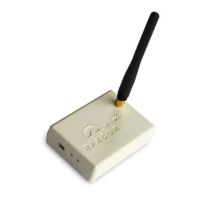
The Aoke 12V DC - 315MHz or 433.92MHz 1 channel relay is available at www.aliexpress.com
store No.110758. Indicate clearly the required frequency when ordering!
The 1 channel learning relays can be used, see the picture below.
For example, for 1 relay:
http://www.aliexpress.com/store/product/DC12V-1CH-wireless-switch-remote-control-system-
remote-control-switch-for-guard-door-window-curtain/110758_936534863.html
or for 6 relays:
http://www.aliexpress.com/store/product/ak-DC12V-1CH-RF-rocker-switch-livolo-switch-system-in-
china-j-12a-108d-smart-house/110758_1007306574.html
The jumper next to the learning button defines to operating mode:
Open = momentary
1-2 = toggle mode
2-3 = on/off mode (to be used with the RFXtrx)


 To Next Page