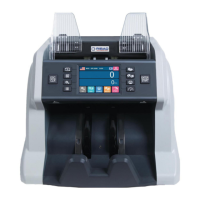
BCS-160User Manual V1.6
2
/
57
Contents
Contents.............................................................................................................................................2
1. Introduction................................................................................................................................. 4
1.1 Preface.................................................................................................................................. 4
1.2 Notice....................................................................................................................................4
2. Installation Notice.......................................................................................................................5
2.1 Installation Notice............................................................................................................... 5
2.2 Installation place notice......................................................................................................5
3. Diagram......................................................................................................................................... 6
3.1 Front Diagram......................................................................................................................6
3.2 Back Appearance................................................................................................................. 7
3.3 Top Appearance................................................................................................................... 8
4. Specification.................................................................................................................................9
5. Display and Operation interface............................................................................................ 10
5.1 Display Interface................................................................................................................10
5.2 Key Function Explanation.................................................................................................10
5.3 Software Interface Explanation........................................................................................12
6. Operation Instruction.............................................................................................................. 13
6.1 Operation............................................................................................................................13
6.2 Currency Setting................................................................................................................ 14
6.3 Counting Modes Selection................................................................................................ 14
6.4 Quantity Batch and Amount Batch Setting..................................................................... 16
6.5 Face/Orientation Sorting Setting.....................................................................................17
6.6 Counting Speed Setting.....................................................................................................18
6.7 Accumulation Function.....................................................................................................18
6.8 Dual User Mode................................................................................................................. 19
7. Check counting result and printing information............................................................... 20
7.1 Check counting result........................................................................................................20
7.2 Check Suspected Notes Details and Serial Number....................................................... 20
7.3 Printing Information......................................................................................................... 22
8. User Setting................................................................................................................................ 22
8.1 Counterfeit Detection Setting...........................................................................................23
8.2 Double banknotes detection setting................................................................................27
8.3 Banknote version sorting setting.....................................................................................27
8.4 Banknote information collection..................................................................................... 28
8.5 Basic setting....................................................................................................................... 32
8.6 Sensitivity Setting for QT sensor......................................................................................38
9. Troubleshooting........................................................................................................................ 38
9.1 Common errors..................................................................................................................38
9.2 Banknote jamming and solution......................................................................................40
10. Software Upgrade................................................................................................................... 40
10.1 MAINBOARD upgrading..................................................................................................41
10.2 IMAGEBOARD upgrading................................................................................................42


 To Next Page