7
The MP 6200SR Series
4. SCSI ID settings
Before installation, set the SCSI ID on the rear panel. A single SCSI interface
can connect with a maximum of seven peripheral SCSI devices. When using
multiple SCSI devices, a different SCSI ID must be set for each of them.
If two peripheral devices use the same SCSI ID number, it will cause
the host computer to operate abnormally or fail to start up.
ON (When the jumper is attached)
OFF (When the jumper is removed)
Before attaching or removing jumpers, make sure the power to the
drive is turned OFF.
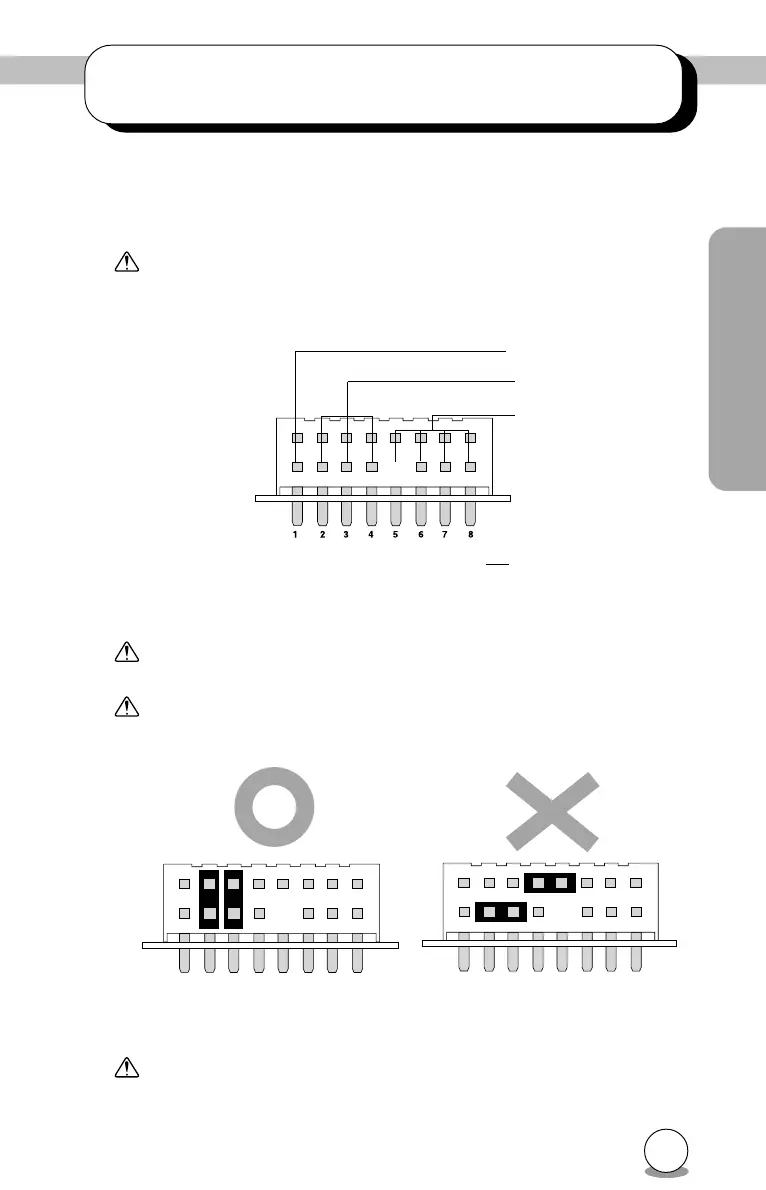
Attach the pins as shown in Figure 1. If the pins are attached side-
ways as shown in Figure 2, the drive may be damaged.
Fig. 1 Fig. 2
The pins besides pins 2-4 don't have any function. If jumpers are
attached to them, abnormal operation may result.
Pin no.
Reserve (Fixed OFF)
SCSI ID
Reserve (Fixed OFF)



 To Next Page