Need help?
Do you have a question about the Ride1up Cafe Cruiser and is the answer not in the manual?
Owner's responsibility for proper assembly, inspection, and safe riding practices.
Age restrictions, weight limits, assembly by experienced mechanics, and water submersion warning.
Guidelines for using the correct charger, handling the battery, and avoiding electrical hazards.
Procedures for checking, testing, and using brakes safely, especially in wet conditions.
Importance of tightening bolts, regular checks, professional inspection, and tire maintenance.
Routine checks, riding at night, age restrictions, and riding behavior guidelines.
Handlebar height, side reflectors, trail limitations, and lithium-ion battery precautions.
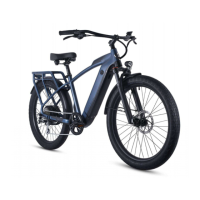
Identification of key components on the e-bike through a labeled diagram.
Step-by-step guide for securely installing the front wheel, including quick release skewer use.
Instructions for correctly inserting and adjusting the seat post for optimal height.
Guidance on attaching the saddle to the seat post and proper torque for bolts.
Correct installation procedure for left and right pedals, emphasizing thread direction.
Specific torque values for saddle clamp, crank arms, and handlebar clamp bolts.
Importance of proper derailleur adjustment to prevent chain issues and damage.
Advice on professional adjustment or using videos for derailleur tuning as parts settle.
How to test and adjust brakes after assembly, including dealing with bent rotors.
How to turn the e-bike system on/off, use the throttle, pedal assist, and headlights.
Guidelines for charging, storing, and maintaining the lithium-ion battery to prevent damage.
Troubleshooting common issues like fender rubbing, bent derailleur hangers, and riding noises.
Steps to diagnose and resolve motor issues, including display settings, cables, and accidents.
How to adjust the kickstand length and troubleshoot clicking noises.
Interpreting charger light indicators and troubleshooting charging issues.
Advice on adjusting gears to prevent chain noise and potential damage from the motor.
Detailed instructions on battery charging, storage, temperature, and charge cycles for longevity.
Basic functions of the e-bike display, including turning the system on/off and headlights.
Instructions on how to switch the display unit between kilometers per hour and miles per hour.
Overview of various display settings and their corresponding codes in the menu.
A table explaining the meaning of various symbols displayed on the e-bike LCD screen.
Procedure for resetting the display settings to factory defaults using specific button combinations.
A list of common error codes, their potential causes, and suggested troubleshooting steps.
Process for filing warranty claims, including shipping damage, part replacement, and required documentation.
 General
| Suspension | Front Suspension Fork |
|---|---|
| Lights | Integrated Front and Rear Lights |
| Motor | 750W geared hub motor |
| Range | 30-50 miles |
| Top Speed | 28 mph (with pedal assist) |
| Frame | Aluminum |
| Brakes | Hydraulic disc brakes |
| Gears | Shimano 7-Speed |
| Display | LCD |
| Pedal Assist Levels | 5 |

 To Next Page