Need help?
Do you have a question about the RIDGID R2401 and is the answer not in the manual?
Ensures safe operating conditions, including lighting and keeping unauthorized persons away.
Covers proper plug use, grounding, and protection against water and damaged cords.
Emphasizes user alertness, protective gear, and avoiding distractions or improper attire.
Ensures safety during servicing and using only identical replacement parts.
Covers handling, workpiece securing, protective gear, and cord inspection.
Alerts to potential chemical exposure from dust and related health risks.
Explains the hierarchy of hazard alert words: DANGER, WARNING, CAUTION, NOTICE.
Defines common symbols used on the product for safe operation and understanding.
Explains the concept of double insulation and its role in electrical safety.
Specifies voltage, frequency, and AC/DC compatibility for the tool.
Provides recommendations for selecting, using, and inspecting extension cords.
Lists key product details such as collet size, no-load speed, and input power.
Describes the depth scale, edge guide, LED worklight, motor, bases, and controls.
Encourages familiarization with features and safety rules prior to operation.
Instructions for unpacking the router and checking for included items and damage.
Details on removing the base, attaching the square subbase, and securing the motor housing.
Step-by-step guide for safely installing and removing router bits.
Covers general warnings, eye protection, accessory use, and overload reset procedures.
Lists common uses and initial steps like turning the router on and off.
Explains how to use the variable speed dial for optimal cutting performance.
Guides on directing feed and preventing kickback for safe operation.
Discusses factors influencing feed rate for clean cuts and preventing motor strain.
Explains the negative effects of improper feed rates on cut quality and tool performance.
Advises on safe depth limits, multi-pass cutting, and using the adjustment mechanism.
Instructions for attaching and using the edge guide for precise trimming.
Covers safe cleaning practices and avoiding chemical damage to plastic parts.
Details lubrication needs, power cord replacement, and general tool care.
Step-by-step instructions for replacing worn motor brushes.
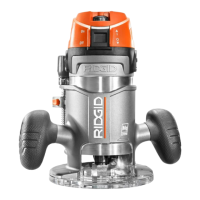
The RIDGID 1-1/2 Peak HP Compact Router, Double Insulation, model R2401, is a versatile power tool designed for various trimming and edge shaping applications. Its primary function is to cut and shape wood and plastics with precision, making it suitable for tasks such as smooth, professional trimming of laminates, trimming countertops, and finishing cabinet work. The router is engineered for ease of use and control, featuring a compact design and several user-friendly functionalities.
One of the key usage features of this router is its Micro-Depth Adjustment with Zero Reset. This allows for precise depth of cut changes, ensuring accuracy in your work. The motor release lever further simplifies depth adjustments, enabling quick and easy changes for larger depth settings. This combination of fine and coarse adjustment capabilities provides the operator with excellent control over the cutting process.
The router is equipped with a Variable Speed Dial, located on the front of the motor housing. This dial allows the user to adjust the bit speed, offering flexibility for different materials and cutting requirements. Higher numbers on the dial correspond to higher speeds, while rotating it to the right decreases speed. This feature is crucial for optimizing cuts and preventing material damage or tool overload.
For enhanced visibility during operation, the router includes an LED Worklight. This light illuminates the cutting area, providing a clearer view of the workpiece and improving accuracy, especially in dimly lit environments.
The design incorporates an Overmolded Grip Area, which is intended to improve grip and comfort for the user, reducing fatigue during extended periods of operation. This ergonomic consideration contributes to better control and safety.
The router features a Removable Base design. This allows for greater access to the collet nut, simplifying the process of installing and removing cutters. The tool comes with both a Round Subbase and a Square Subbase. The round subbase facilitates easier rotation of the tool when trimming with a guide, while the square subbase is beneficial for working with a straight edge, offering stability and precision for different types of cuts.
A Spindle Lock is integrated into the design, securing the spindle and allowing for cutter changes with only one wrench. This simplifies the process of loosening the collet nut and swapping out bits.
The Slide Switch, located on top of the motor housing, features a soft start mechanism. This prolongs motor life by reducing the initial surge of power and provides the operator with more control when starting the router, preventing abrupt movements.
For guiding cuts, the router includes an Edge Guide. This accessory helps maintain a consistent distance from the edge of a straight workpiece, ensuring uniform and accurate cuts. The guide bars thread into the base, and thumb screws secure the edge guide in place after the desired offset is measured.
The router also incorporates Overload Protection. This built-in safety feature protects the motor by automatically shutting off the tool if it is forced or overloaded. This prevents damage to the motor and extends the life of the tool.
Regarding maintenance features, the manual emphasizes the importance of using identical replacement parts for any servicing. This ensures that the safety and performance of the power tool are maintained. For major repairs or servicing, it is recommended to return the tool to an authorized service center.
General maintenance involves keeping the tool clean. The manual advises against using solvents on plastic parts, as many commercial solvents can cause damage. Instead, clean cloths should be used to remove dirt, dust, oil, and grease. It is particularly important to clean the tool with compressed air if it has been used on abrasive materials like fiberglass, wallboard, spackling compounds, or plaster, as these materials can accelerate wear and lead to premature failure of components like bearings and brushes.
The tool's bearings are lubricated for life with a high-grade lubricant under normal operating conditions, meaning no further lubrication is required by the user.
Brush replacement is a maintenance task that can be performed by the user. The manual provides instructions for removing the brush cap, washer, and brush assembly. It specifies checking for wear and always replacing brushes in pairs if one is worn, to ensure balanced performance. Proper alignment of the washer notches with the spring line is crucial during reassembly.
The manual also addresses power supply cord replacement, stating that if necessary, this must be done by an authorized service center to avoid safety hazards.
Throughout the manual, there is a strong emphasis on safety, with warnings about inspecting the tool for damage, ensuring proper assembly, and disconnecting from the power supply before any maintenance or adjustments. The importance of wearing eye protection and other personal protective equipment is also highlighted.
 General
| LED Light | Yes |
|---|---|
| Soft Start | Yes |
| Variable Speed | Yes |
| Maximum Speed | 30, 000 RPM |
| Voltage | 120V |
| Base Type | Fixed |
| Depth Adjustment | Yes |
| Collet Diameter | 1/4 inch |
| Amperage | 2.4 Amp |
| Cord Length | 6 ft |
| Amps | 2.4 Amp |
| Certifications and Listings | ETL |


 To Next Page