EasyManua.ls Logo

Riken Keiki GX-3R - User Manual

Riken Keiki GX-3R
93 pages
Print Icon
To Next Page IconTo Next Page
Loading...
PT0E-1767
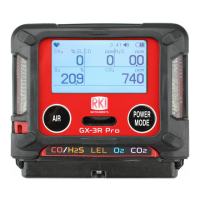
Portable Gas Monitor
GX-3R
Operating Manual
(PT0-164)
2-7-6 Azusawa, Itabashi-ku, Tokyo, 174-8744, Japan
Phone : +81-3-3966-1113
Fax : +81-3-3558-9110
E-mail : intdept@rikenkeiki.co.jp
Web site : http://www.rikenkeiki.co.jp/

Table of Contents

Questions and Answers

  • C
    Christian RomeroJul 27, 2025
    What to do if Riken Keiki Monitor shows low battery voltage alarm?
    • M
      Monique TateJul 28, 2025
      If your Riken Keiki Monitor displays a '' message, it means the battery level is low. To resolve this, turn off the power and charge the battery in a safe place where the ambient temperature is between 0 °C and +40 °C.
  • D
    Donald StrongAug 1, 2025
    Why does Riken Keiki GX-3R turn off immediately after turning on?
    • T
      Theresa SilvaAug 1, 2025
      If your Riken Keiki Monitor turns off immediately after you turn it on and displays '', the battery level is likely too low. Turn off the device and charge the battery in a safe place at temperatures between 0 °C and +40 °C.
  • T
    troynobleAug 6, 2025
    What to do if Riken Keiki GX-3R shows abnormal operation?
    • K
      Kelsey ThomasAug 6, 2025
      If your Riken Keiki Monitor is behaving abnormally, it might be due to interference from static electricity or other noise. Try turning the power off and then back on again to see if that resolves the issue.
  • D
    Dale HardyAug 12, 2025
    Why Riken Keiki Monitor triggers gas alarm with no gas leak?
    • F
      frankmyersAug 12, 2025
      If a gas alarm is triggered on your Riken Keiki Monitor when there's no apparent gas leak, it could be due to interference gases or noise. Interference gases are difficult to completely eliminate. Another potential cause is noise. Try turning the power off and then back on again. If the issue persists, investigate and address potential noise sources.
  • D
    Daniel GarzaAug 17, 2025
    Why Riken Keiki GX-3R charge LED flashes green and orange?
    • J
      Jerry ColemanAug 17, 2025
      If the charge LED on your Riken Keiki Monitor flashes alternately green and orange, it indicates that the temperature is outside the allowable charging range. Make sure you are charging the device where the ambient temperature is between 0 °C and +40 °C.
  • E
    elizabethlarsonAug 21, 2025
    Why Riken Keiki Monitor reading rises or drops and remains unchanged?
    • J
      James JohnsonAug 21, 2025
      If the reading on your Riken Keiki Monitor rises (or drops) and remains unchanged, it could be due to sensor drift, presence of interference gases, slow leakage of the detection target gas, or environmental fluctuations. You can try performing air calibration to address sensor drift or environmental fluctuations. For interference gases, it is difficult to completely eliminate their effects. For slow leakage, take the same action as for gas alarms.

Summary

1 Product Overview

1-3. Safety Alerts

Explains the manual's safety alert symbols for hazard communication.

2 Important Safety Information

2-1. Danger Information

Highlights critical hazards and precautions for safe operation and preventing explosions.

2-2. Warning Information

Provides crucial warnings regarding product handling, sensor safety, and alarm situations.

3 Product Configuration

4 Alarm Activation

4-1. Gas Alarm Activation

Explains gas alarm types, prioritization, and default setpoints for various gases.

5 Usage Instructions

5-4. Air Calibration

Describes the process of zero adjustment using fresh air for accurate gas concentration measurements.

5-5. Gas Detection & Operation

Overview of gas detection, including basic operating procedures and measurement mode.

6 Setting Procedure

7 Maintenance

7-1. Maintenance Intervals & Items

Outlines recommended maintenance intervals and specific items for daily, monthly, and regular checks.

7-2. Calibration

Explains calibration procedures, including preparation and setting menus.

7-3. Bump Test

Details the procedure for performing a bump test (function check) on the product.

9 Troubleshooting

9-1. Product Abnormalities

Lists common product abnormalities, their causes, and recommended actions.

9-2. Reading Abnormalities

Addresses issues related to abnormal readings, sensor drift, and gas alarm triggers.

10 Product Specifications

Riken Keiki GX-3R Specifications

General IconGeneral
Detection GasesLEL, O2, H2S, CO
Detection PrincipleCatalytic combustion (LEL), Electrochemical (O2, H2S, CO)
LEL Range0-100% LEL
BatteryRechargeable lithium-ion battery
Humidity Range0 to 95% RH (non-condensing)
Device TypeMulti-gas monitor
Target GasesOxygen, Hydrogen Sulfide, Carbon Monoxide
O2 Range0-30% vol
H2S Range0 to 100 ppm
Alarm Set PointsAdjustable
Alarm MethodAudible, visual, and vibration alarms
DisplayLCD with backlight
Operating Temperature-20 to +50°C
Protection degreeIP66
CO Range0-500 ppm

Related product manuals