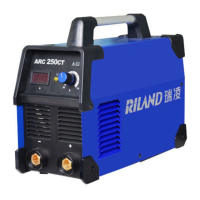
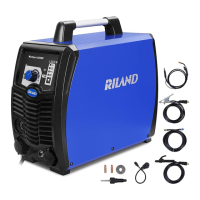
This document describes the ARC 250G/315G/400G series of inverter welding machines, which utilize advanced inverter technology and high-power IGBT components to convert 50/60Hz frequency up to 15KHz, then reduce voltage, commutate, and output high-power voltage via PWM technology. This design significantly reduces the weight and volume of the main transformer and increases efficiency by 30%, marking a revolution in the welding industry.
Function Description:
The ARC 250G/315G/400G welding machines are rectifiers designed to provide a strong, concentrated, and stable arc. They offer quick response when the stick and workpiece short, making it easier to design different dynamic characteristics and allowing for adjustments to make the arc softer or harder. These machines are effective, power-saving, compact, and feature a stable arc, good welding pool, high no-load voltage, and excellent force compensation capacity, making them multi-purpose. They are capable of welding stainless steel, alloy steel, carbon steel, copper, and other colored metals. They can be used with electrodes of various specifications and materials, including acidity, alkalinity, and fiber, and are suitable for high-altitude environments, open-air work, and both indoor and outdoor decoration. The series is particularly well-suited for welding tubes, boilers, vacuum pressure vessels, or other high-quality welding applications where perfect welding quality is essential. They also provide sufficient no-load voltage and output ability, making them ideal for long cable welding.
Important Technical Specifications:
The ARC 250G, ARC 315G, and ARC 400G models share many core specifications but differ in output capacity and physical dimensions.
- Power Voltage: All models operate on Three Phase AC 400V±15%.
- Frequency: 50/60 Hz for all models.
- Rated Input Current:
- ARC 250G: 14.4 A
- ARC 315G: 19.7 A
- ARC 400G: 27.6 A
- No-load Voltage:
- ARC 250G: 66 V
- ARC 315G: 69 V
- ARC 400G: 68 V
- Output Current:
- ARC 250G: 20-250 A
- ARC 315G: 20-315 A
- ARC 400G: 40-400 A
- Rated Output Voltage:
- ARC 250G: 20.8-30 V
- ARC 315G: 20.8-32.6 V
- ARC 400G: 21.6-36 V
- Duty Cycle (0-100%): 60% for all models.
- Efficiency: 85% for all models.
- Power Factor: 0.93 for all models.
- Insulation Grade: F for all models.
- Housing Protection Grade: IP21 for all models.
- Weight:
- ARC 250G: 17.5 Kg
- ARC 315G: 20 Kg
- ARC 400G: 22 Kg
- Dimensions (mm):
- ARC 250G: 455×202×372
- ARC 315G: 485×234×425
- ARC 400G: 515×262×468
Usage Features:
The machines are equipped with power voltage compensation, allowing normal operation even when the power voltage fluctuates within ±10% of the rated voltage. For long cable usage, a larger section cable is recommended to prevent voltage drop and maintain performance.
- Installation: Ensure the machine's intake is not blocked. Connect the housing to the ground using an inducting cable of at least 6 mm². Correctly connect the arc torch or holder and the earth clamp, paying attention to polarity. DC welding machines offer two connection methods: positive connection (holder with "-" polarity, workpiece with "+" polarity) and negative connection (workpiece with "-" polarity, holder with "+" polarity). The appropriate method should be chosen based on working demands to avoid unstable arc, spatters, or conglutination.
- Operation: After opening the power switch, the screen displays the set current, and the ventilator starts. Welding current and arc-striking push knobs allow adjustment for specific welding demands. Recommended current ranges for different electrode sizes are provided: φ2.5 (70-100A), φ3.2 (110-140A), φ4.0 (170-220A), and φ5.0 (230-280A). The arc-striking drive knob helps adjust welding function, especially at low currents, providing powerful energy and push current.
- Safety Features: An anti-shock device (VRD) can be installed. When the VRD switch on the back panel is "ON," the VRD indicator lights up, and the no-load voltage is reduced to less than 15V for safety. When "OFF," the no-load voltage is 60-70V.
- Remote Control: If a remote control device is coordinated, ensure its switch is in the "ON" position and the plug is firmly inserted. If not using remote control, the switch should be "OFF" to allow panel adjustments.
- Hot Initiation: Provides heavy current for a perfect effect and easier striking.
- Environment: The machine operates in dry environments with humidity up to 90%, and ambient temperatures between -10°C and 40°C. Avoid direct sunlight, dripping water, dusty areas, corrosive gases, and strong airflow.
- Protection: The machine includes protection circuits for over-voltage, over-current, and over-heat. If these limits are exceeded, the machine will automatically stop. An indicator light turns red if the machine overheats due to exceeding the duty cycle. In such cases, the machine should be allowed to cool down with the fan running until the indicator light turns off.
Maintenance Features:
Regular maintenance is crucial for the longevity and performance of the welding machine.
- Dust Removal: Regularly remove dust using dry, compressed air. In environments with smoke and pollution, cleaning should be done monthly. The pressure of compressed air must be within a reasonable range to avoid damaging internal components.
- Circuit Check: Periodically inspect the internal circuits to ensure connections are correct and tight, especially plug-in connectors and components. Clean any scale or rust found and re-tighten connections.
- Moisture Prevention: Prevent water and steam from entering the machine. If this occurs, blow it dry and check the insulation.
- Storage: For long-term storage, pack the machine in its original box and store it in a dry and clean environment.
- Dynamotor Connection Warning: Connecting the welding machine directly to a dynamotor can cause damage due to heavy voltage pulses. Only asynchronous dynamotors with steady frequency and voltage should be used. Damage resulting from direct dynamotor connection is not covered under warranty.
- Troubleshooting: The manual provides a troubleshooting guide for common issues like no display/output, abnormal indicator light, excessive spatter, or erratic output current. Solutions include checking power switches, input voltage, connections, and components like IGBTs, rectifiers, and control boards. If problems persist after these checks, users are advised to contact the local dealer or after-sales service department. All maintenance and repair operations should be performed by qualified electricians.



 To Next Page
 General