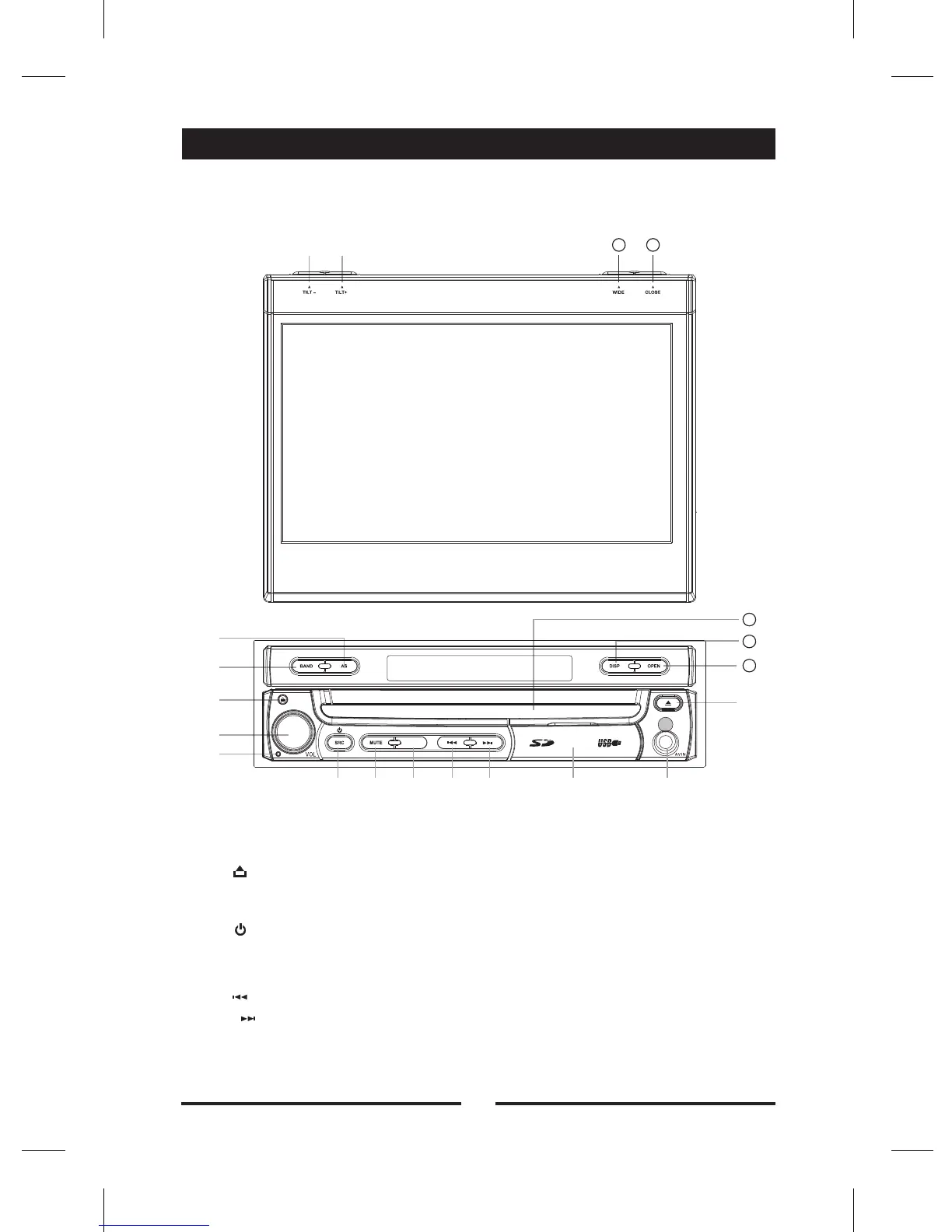
Front Panel
B e f o r e u s i n g
1. [AS/TILT+] Key: Auto Save / Increase display angle
2. [BAND/TILT-] Key: Change radio band / Decrease display angle
3. [ ] Key: Remove the front panel
4. [VOL] Knob Key: Adjust volume/ Play or pause(short press)
5. Reset the unit
6. [ /SRC] Key: Unit power / Switch to the current mode and main menu
7. [MUTE] Key: Mute audio outputs
8. [RPT] Key: Enter the repeat mode
9. [ ] Key: Auto search / Previous / Move cursor to the left
10. [ ] Key: Auto search(Radio mode) / Next / Move cursor to the right
11. SD card slot
USB slot
12. AV IN jack
01
①
②
③
④
⑥ ⑦ ⑧ ⑨ ⑩ ⑪
⑬
⑫
①②
⑤
14
15
16
1415
RPT


 To Next Page