03
B e f o r e u s i n g
INT
CLEAR
TILT
OPEN/CLOSE
BAND
EQ
*
RPT
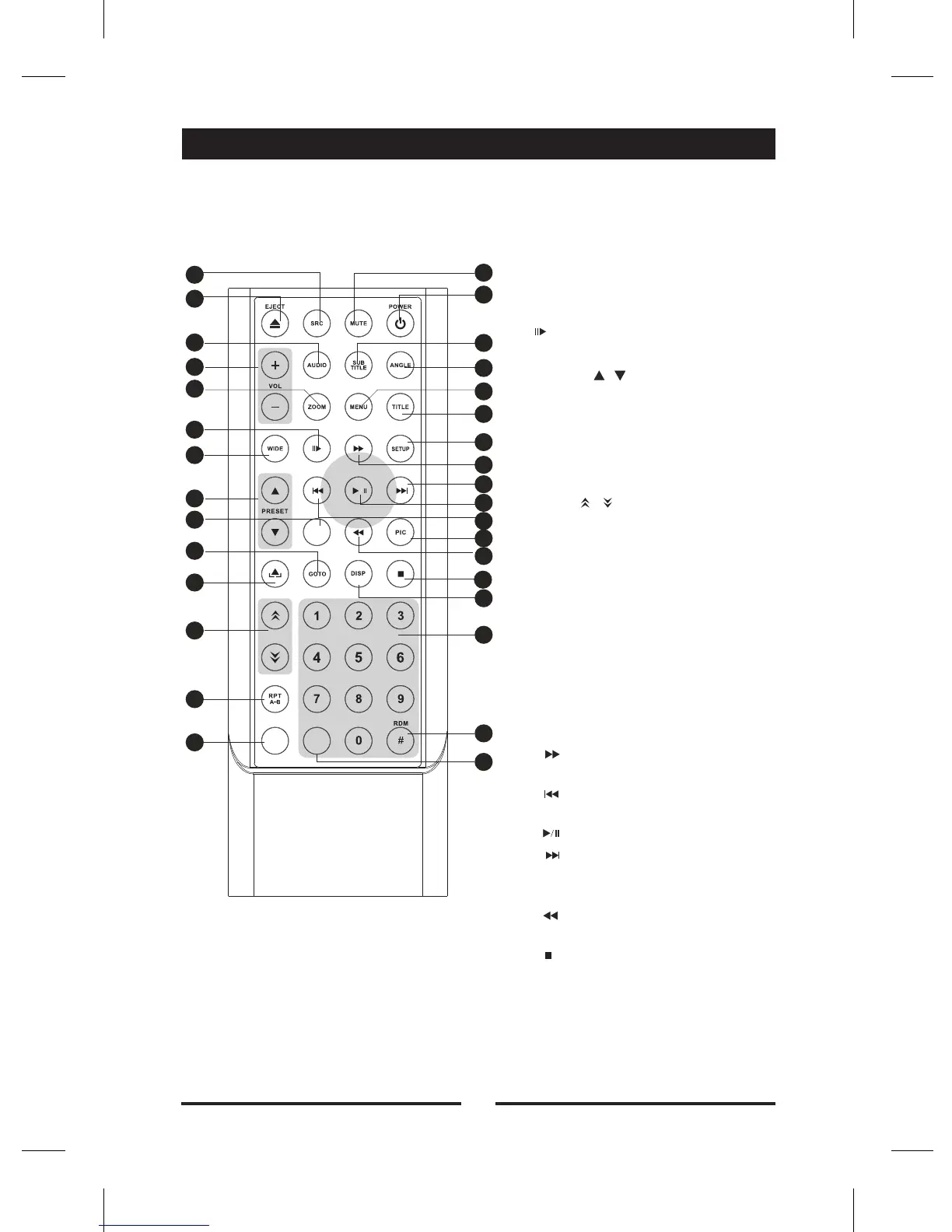
1. select ource
2.[EJECT]Key: Eject disc
3.[AUDIO] Key: Select DVD dialogue
language
4.[VOL+/-] Key: Adjust volume
5.[ZOOM] Key: Image zoom in/out
6.[ /BAND] Key: Select radio band
7.[WIDE] Key: Change display mode
8.[PRESET / ] Key: Select preset
radio station
9.[EQ] Key: Enter/Exit the EQ setting
10.[GOTO] Key: GOTO search
11.[OPEN/CLOSE] Key: Open / Close
the TFT monitor
12.[TILT / ] Key: Adjusting display
tilting angle
13.[RPT A-B] Key: A-B repeat
14.[RPT] Key: Repeat playback
15.[MUTE] Key: Mute audio outputs
16.[POWER] Key: Unit power
17.[SUBTITLE] Key: Select DVD
subtitle language
18.[ANGLE] Key: Select view angle
19.[MENU] Key: DVD MENU / PBC
20.[TILT ] Key: DVD TITLE
21.[SETUP] Key: Setup menu
22.[ ] Key: Fast Forward /
Move cursor up
23.[ ] Key: Auto search / Previous /
Move cursor to the left
24.[ ] Key: Play / Pause / Enter
25.[ ] Key:Auto search / Next /
Move cursor to the right
26.[PIC] Key: Image setting
27.[ ] Key: Fast Reverse/
Move cursor down
28.[ ] Key: Stop Playback
29.[DISP/CLEAR] Key: Display information/
Clear information
30.[0~9] Key: Numeric keys
31.[RDM] Key: Random playback
32.[ /INT] Key: Input sign / Intro playback
[SRC]Key: playing s
Remote Control
Introduce of key functions
Note:
Your remote control may differ slightly
from the one pictured here. The above
diagram is for illustrative purpose only.
1
2
3
4
5
6
7
8
9
10
11
12
13
14
15
16
17
18
19
20
21
22
23
24
25
26
27
28
29
30
31
32
*


 To Next Page