7
NOTE: Set the keypad language according to the language in the control panel.
3. Press
4. Press the keys to adjust the level settings.
5. Press to save the adjustment.
6. Press to exit the Keypad settings menu.
NOTE: Each keypad's settings are defined separately.
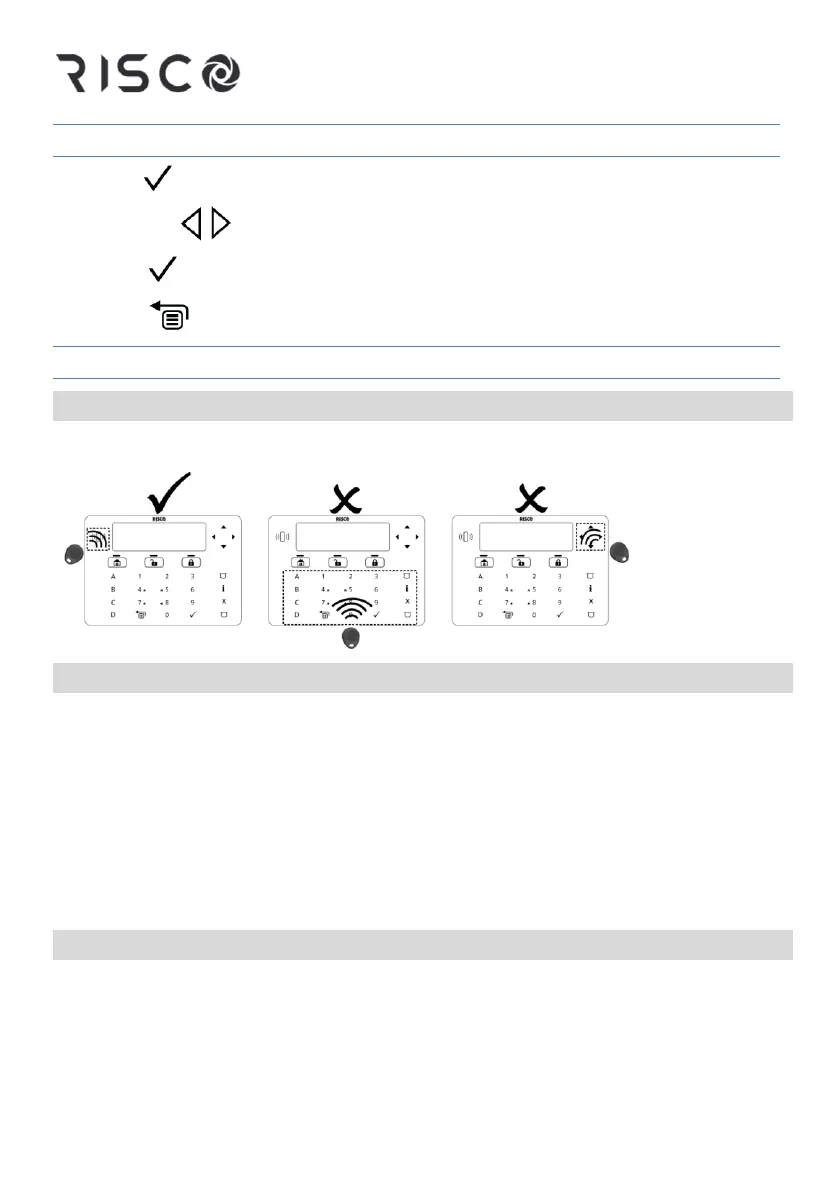
Proximity Tag
Present the Proximity Tag as shown in the following illustrations:
Cleaning the Keypad
To lock the keypad:
Press 1 and 3 simultaneously for 2 seconds.
The keypad will beep to notify that the keypad is locked. The keypad will
automatically unlock itself after 45 seconds. To release the keypad lock manually,
press 1 and 3 simultaneously for 2 seconds.
To clean the keypad
Use a non-abrasive damp cloth. Do not expose the screen directly to liquid.
Changing the User Codes
Change the user codes regularly.
For information about programming the system refer to the relevant RISCO
security system installer and user manuals.




 To Next Page