BLOCKSYSTEM FA - FT Pag. 21 REV. 04 10/07
UK
7
STARTING THE MACHINE
Before starting the Blocksystem, make sure of the following:
• All locking screws are correctly tightened
• All electrical connections have been made correctly.
• The coldroom door is closed so that the door microswitch contact is closed.
7. 1
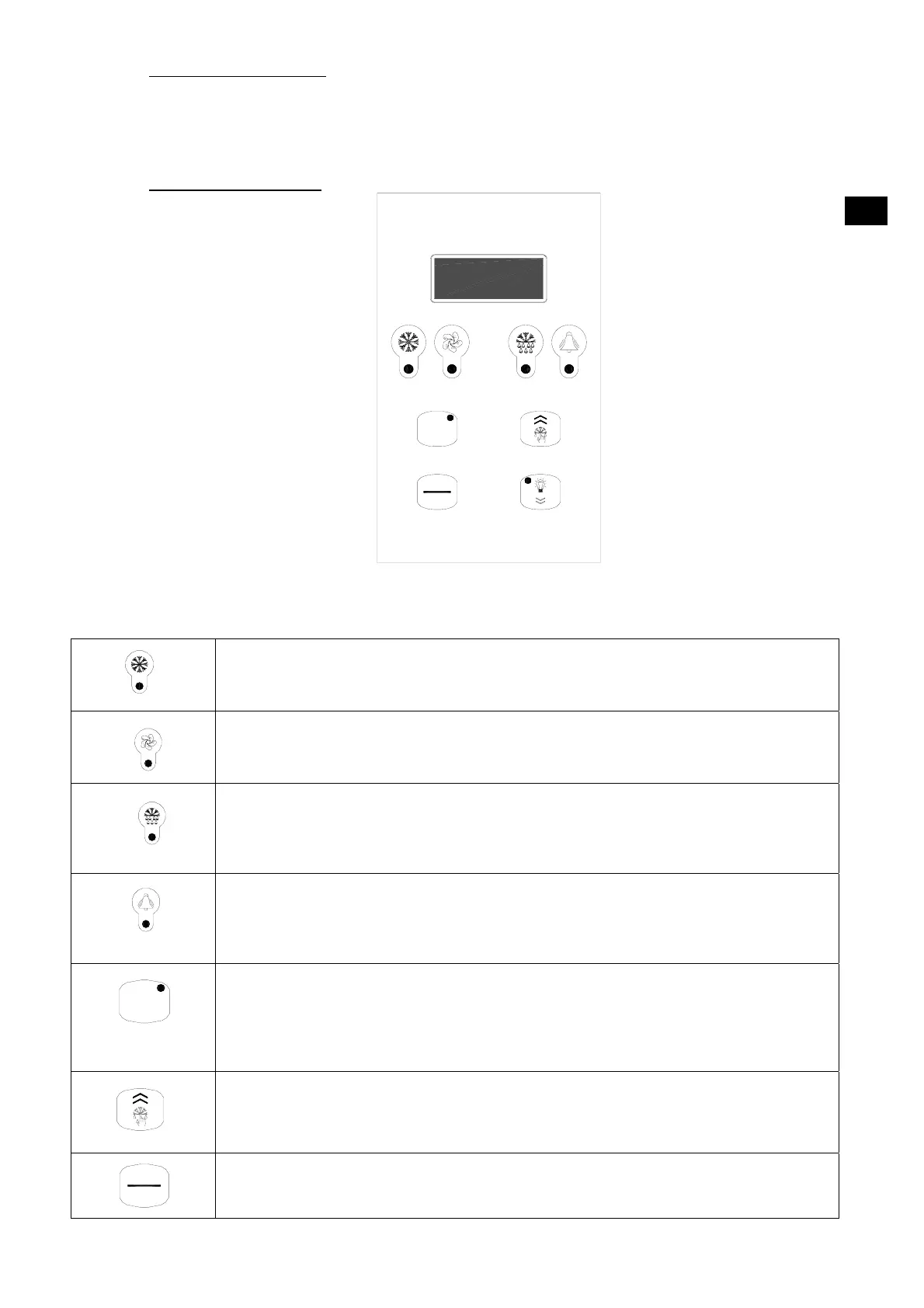
Control panel description
Green “COMPRESSOR” LED
OFF: The compressor is off
LIT: The compressor is operating
.
BLINKING: The switch on request is pending (delays or protective devices activated)
Green “FANS” LED
OFF: The fans are off
LIT: The fans are operating
BLINKING: The switch on request is pending (delays or protective devices activated)
Green “DEFROSTING” LED
OFF: Defrosting is not activated
LIT: Defrosting is in progress
BLINKING: Manual defrosting is in progress; a defrosting request is pending (delays or
protective devices activated); network synchronised (master/slave) defrosting
Yellow “
ALARM LED”
OFF: No alarm is in progress
LIT: A serious alarm is in progress (and alarm relay activated)
BLINKING: A non-serious alarm is in progress or a serious alarm has been silenced (alarm relay
deactivated)
“SETPOINT” key + “SETPOINT/REDUCED SET” green LED
LIT: The setpoint is displayed
BLINKING: The reduced set is activated
ENTER” key: This is used to set the setpoint, to access the programming menu, and to view the
machine status (if held down for 1 second); to enter the programming mode, this key must be
held down for 5 seconds.
“UP” key: This is used to command manual defrosting (if held down for more than 5 seconds) as
well as to increase the value of the parameter being displayed and to scroll forwards through the
menu list.
“ON/OFF”
key: This is used as a manual on-off control, to confirm a parameter value and it also
allows you to return to the previous menu. To switch the machine on or off, hold this key down
for more than 5 seconds.
set
on
off
set
on
off



 To Next Page