7
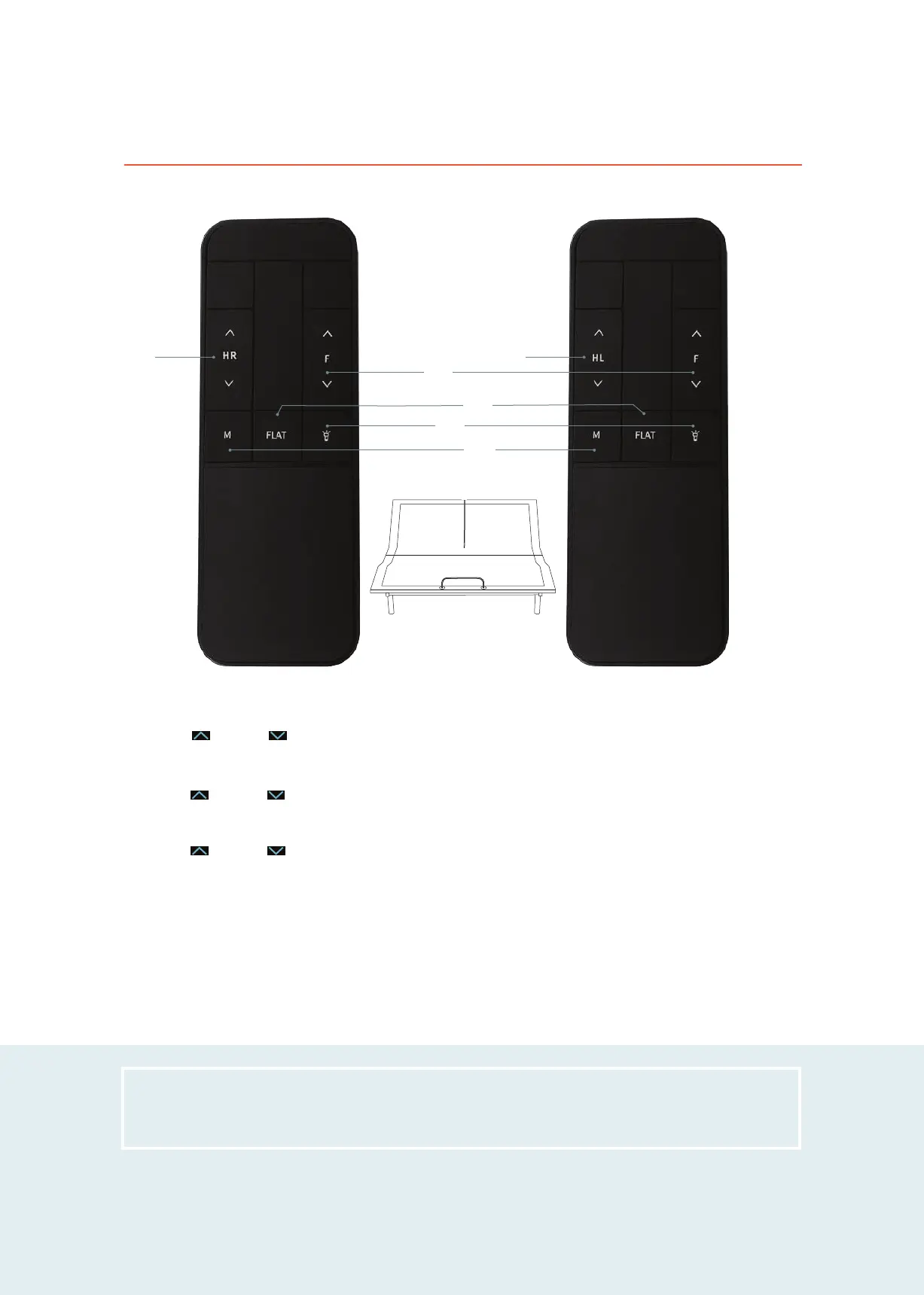
Left Head Position Adjustments (2)
Press the UP or DOWN arrows on the "HL" button to raise or lower the left head section of your bed.
1
3
NOTE: Make sure your bed is in a flat position before using it.
Remote control guide
Right Head Position Adjustments (1)
Press the UP or DOWN arrows on the "HR" button to raise or lower the right head section of your bed.
LEFT HEAD REMOTE (HL)RIGHT HEAD REMOTE (HR)
Presets (4, 5, 6)
FLAT (4)
Press this button to return the bed to flat position.
FLASHLIGHT (5)
Press this button to turn on the flashlight on your remote
control. Release the button to turn it off.
MEMORY (6)
Save your favorite position by adjusting the sections to your
desired position. Press and hold the "M" button on the remote
for 3 seconds., you will hear a beep and the postions is saved.
Foot Position Adjustments (3)
Press the UP or DOWN arrows on the "F" button to raise or lower the foot section of your bed.
5
6
7
2
4
HR HL


 To Next Page