English 7 of 20
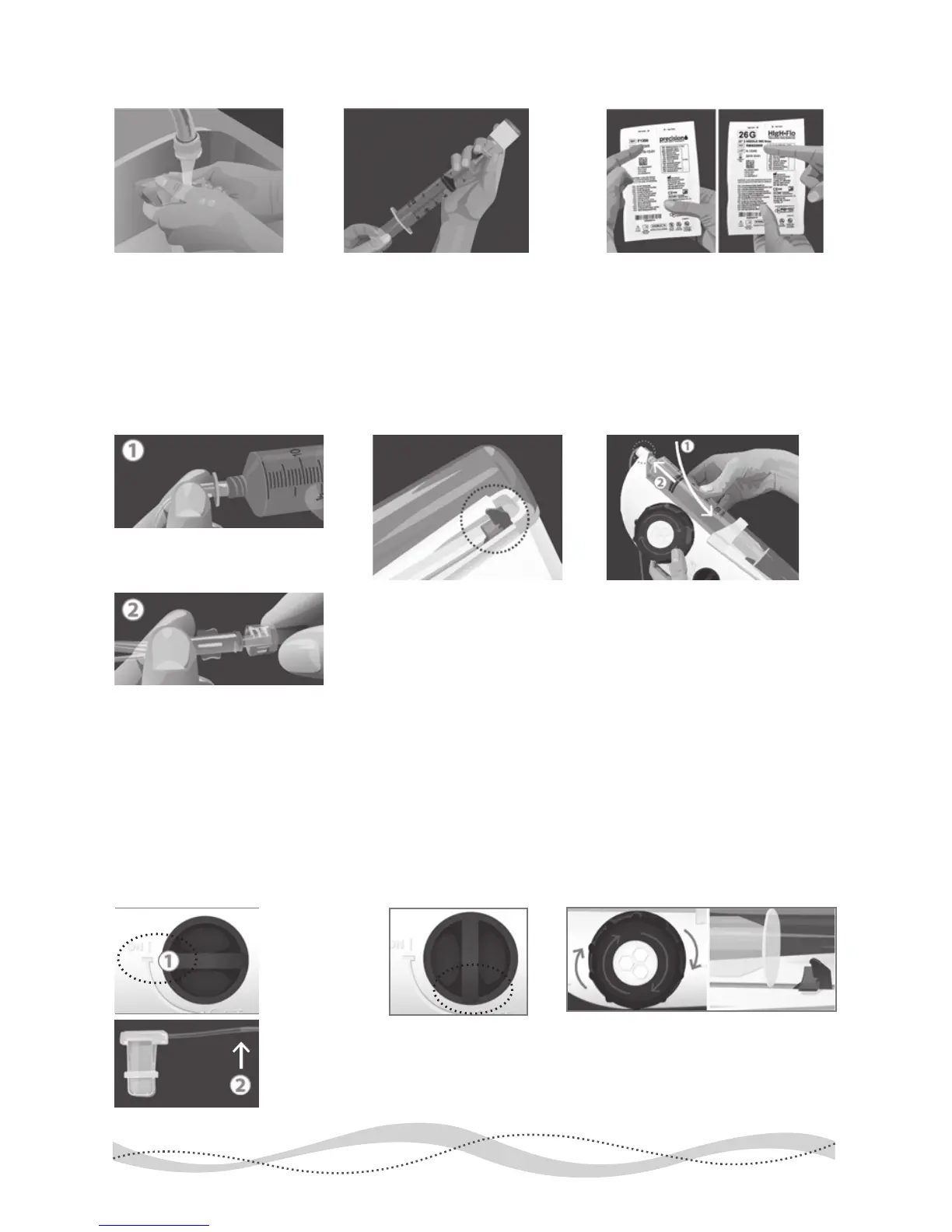
Prepare the FREEDOM60® Syringe Driver:
1 Wash Hands
4 Attach Tubing 6 Insert Syringe5 Check Black Tab
2 Fill Syringe
Prime Tubing:
For SubQ Infusions, follow these instructions:
3 Verify Tubing & Needles
Verify that you are using the
correct tubing and needle sets
recommended by your health-
care provider and prescribed
by your doctor.
Be sure the product is at room
temperature before you begin
lling the 60 ml syringe with
your required dose. Refer to
the manufacturer's instructions
or ask your provider for more
detailed lling instructions.
Gather supplies. Wash
your hands thoroughly
and, if required, put on
disposable gloves.
1. Remove sterile cap from the
luer disc end of the RMS Precision
tubing set and connect to syringe.
For SubQ only:
2. Remove sterile caps from
opposite end of tubing set and
HIgH·Flo needle set and connect,
using care not to contaminate ends.
Make sure the syringe
driver is o and the black
tab inside the clear syringe
shield is at the end of its
track. If the black tab is not
at the end of its track, wind
the large knob clockwise.
With syringe gradations
facing up,
1.
load the syringe and its
tubing into the syringe driver.
2.
Make sure the luer disc is
fully seated in the driver’s nose.
1 Turn ON 2 Turn OFF 3 Wind Back
1.
Turn the
syringe driver’s
ON/OFF
switch to the
ON position
to prime (ll)
the tubing,
2.
but try to
stop the ow
about 2” short
of the needle(s).
To stop ow to the
needle(s), turn the
syringe driver’s
ON/OFF switch to
the OFF position.
Wind the large knob clockwise until
the black tab is clearly not touching
the syringe. This will release pressure
on the plunger and stop the ow


 To Next Page