12 English English 13
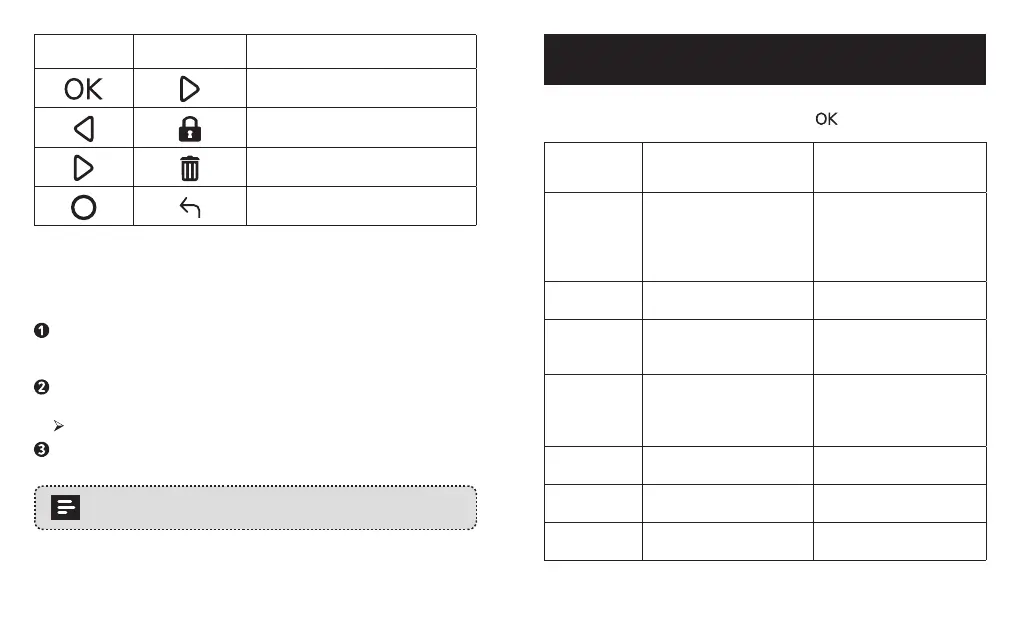
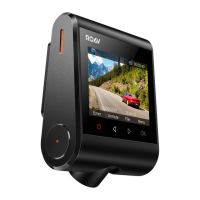
Button Virtual Button Function
Play / Pause
Lock Current / Unlock Current
Delete Current / Delete All
Return to previous menu
To view and play video with the DashCam Viewer
The saved videos can be viewed and played with the DashCam
Viewer (not provided).
Download the Anker Roav DashCam Viewer video player from
the website: https://www.dropbox.com/sh/4v5nmnl5hu5m4fi/
AABDuOxwkiIaohwOpQJ9DrFXa?dl=0
Remove the microSD card from DashCam Duo and insert it into
your device’s microSD card slot.
All the saved files will be displayed.
Follow the instructions on DashCam Viewer’s manual to play
videos.
DashCam Viewer runs on Windows and Mac-based
computers.
System Setup
To adjust DashCam Duo’s settings, press .
Menu
Options
Description Available Options
Resolution Set a desired video
resolution.
1080p + 1080p @30fps
/ 1080p + 720p @30fps
/ 720p + 1080p @30fps
/ 720p + 720p @30fps
Loop
recording
Set the duration of each
recording video clip.
1 minute / 3 minutes / 5
minutes / 10 minutes
LCD display
mode
Choose the LCD display
source.
Front Camera / Interior
Camera / PIP Front Full /
PIP Behind Full
LCD auto o Turn o the screen
backlight after a period
of inactivity. Recording
continues.
30 Seconds / 60
Seconds / O
Sound
recording
Enable or disable sound
recording.
On / O
Machine
sound
Mute or unmute. On / O
Voice prompt Enable or disable voice
prompt.
On / O


 To Next Page