Touchpad Small
54mm x 95mm viewing area
Seymour Duncan
Hot Rodded Humbucker
Before calibrating, first follow the Tune Up, Clean Up and Power Up steps above as
calibration may not be required.
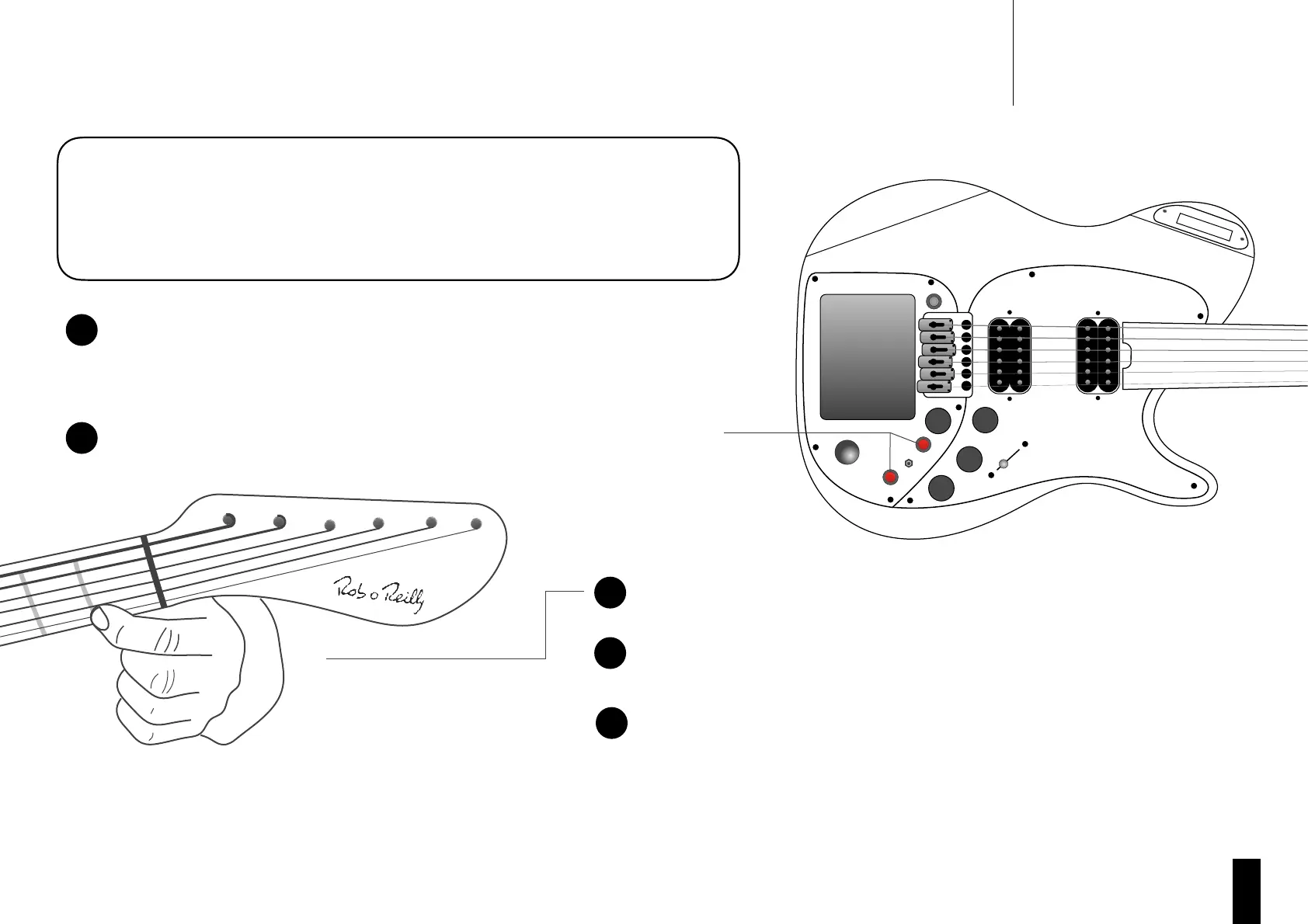
Press and hold fret 1 of the string you wish to calibrate. A MIDI note will sound
and the infinity lights will flash. Be sure to fret only one string at a time.
When the LCD indicates, slide to the second fret and hold.
Releasing the string for longer than 5 seconds at any time will cancel the
calibration, as will fretting the wrong note or a poor electrical contact.
Continue in this way until you have reached the top fret. Once the LCD displays
“complete” and you hear a double note sound for the top fret, you have
successfully completed calibration for this string.
1. Clean Up: Cleaning your string/fret contacts before calibrating is very
important for accurate calibration. Follow the guidelines in the Power
Up section.
2. Tune Up: Make sure your guitar is tuned to standard guitar tuning.
3. Power Up & Initialise: Switch your MIDI Pro 2 off and back on (Powering
from a USB Cable). (Keep your hands off the strings).
Press and hold the “Octave Down” and the “Octave Up” buttons together.
The LCD screen displays “Hold Fret 1 to Calibrate”. Continue to hold both
buttons.
Tips:
• Once you reach step 4 you may release the octave up and octave down button at any time.
• If the display shows “cancelled” while holding a fret, it is most likely due to a poor electrical contact. To avoid this, ensure to press the string firmly against
the fret and move the string slightly up and down on the fret to create good electrical contact.
• If calibration will not start on a string, power off and repeat ‘Power Up & Initialise’.
Your MIDI Pro requires occasional ‘String Calibration’ for optimum performance.
Calibration should not be required more than once every number of months unless a
string change was recently performed. If you require regular calibration, follow the
‘Nut Cleaning Guide’ below.


 To Next Page