Use Instruction
吸油烟机
Range Hood
High
Low
Light
Power
Auto
6
Plug in and 3 tick from the buzzer will indicate qualified installation. The hood is in standby.
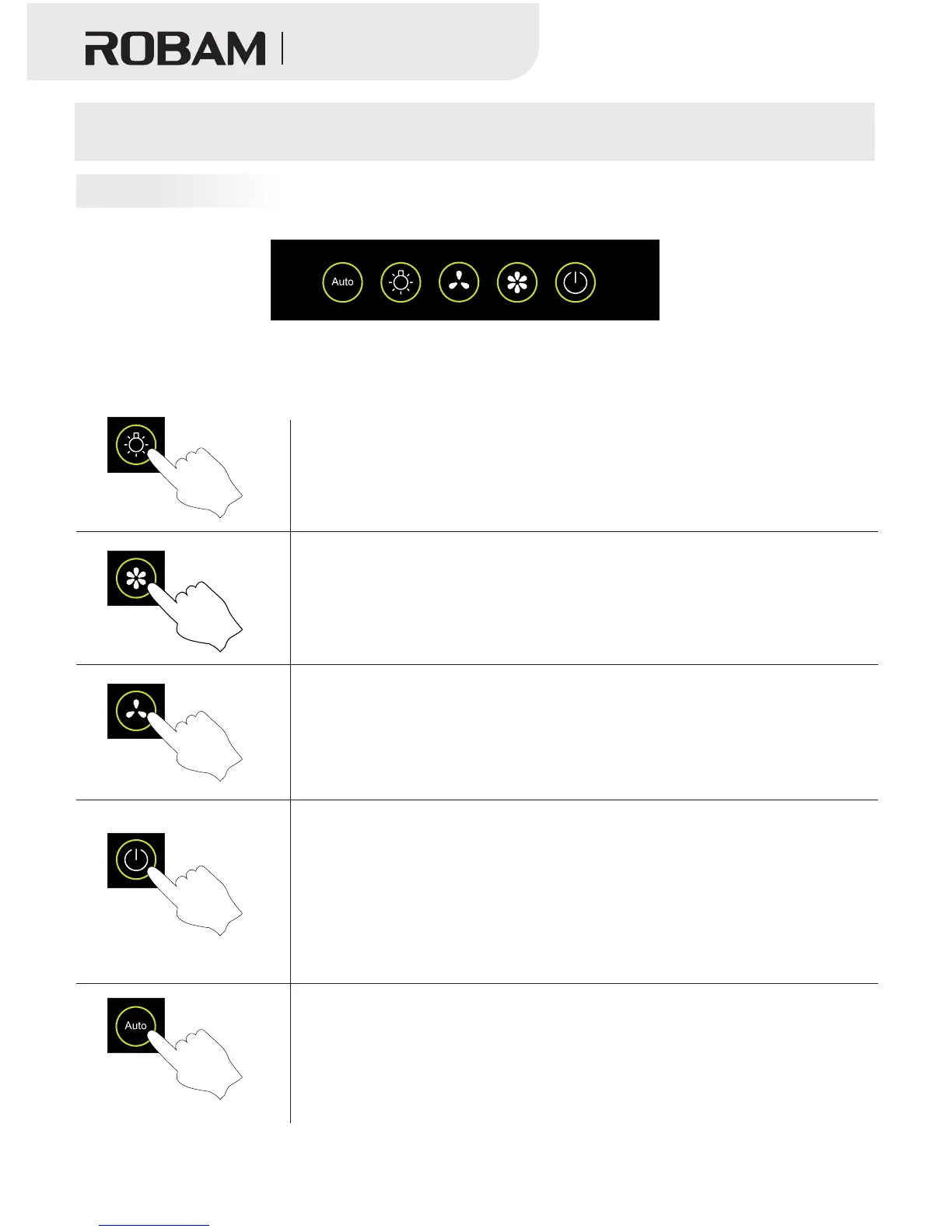
●Press the light button to turn on the light and repress to turn it off.
● Press the power button, the light of “Power” buttonturn on,press
“High” button, the motor work with high speed. If press the “Low”
button,it will work in the normal speed states.
●After connect with power, press “Power” button,the light of “Power”
turn on,press “Low”,the motor works with low speed, press “High”
button again,it will change to high speed level.
●When the power icon is lit up and only the spotlight is “ON”, press
the “Power” button gently and the spotlight will be turned off directly; if
the fan is working, press the”Power” button, the power icon will flash
and the fan will be shut down after 1min. (The function of “Light”, “ High”,
“Low” and “Auto” button can’t be working under delay status). If the
“Power” icon is spotlight, Press the “Power” button again, all functions
will be disabled.
● When "Power" icon turns on, press "Auto" , the gas sensor and
heat sensor will be turned on. During cooking status, if the gas
concentration or temperature reaches default, hood will turn on high
speed, and " High" icon will turn on. Just press "Power" or " Auto"
to cancel gas sensor or heat sensor function.
Auto
Light
Low High
Power
Switch Control Panel



 To Next Page