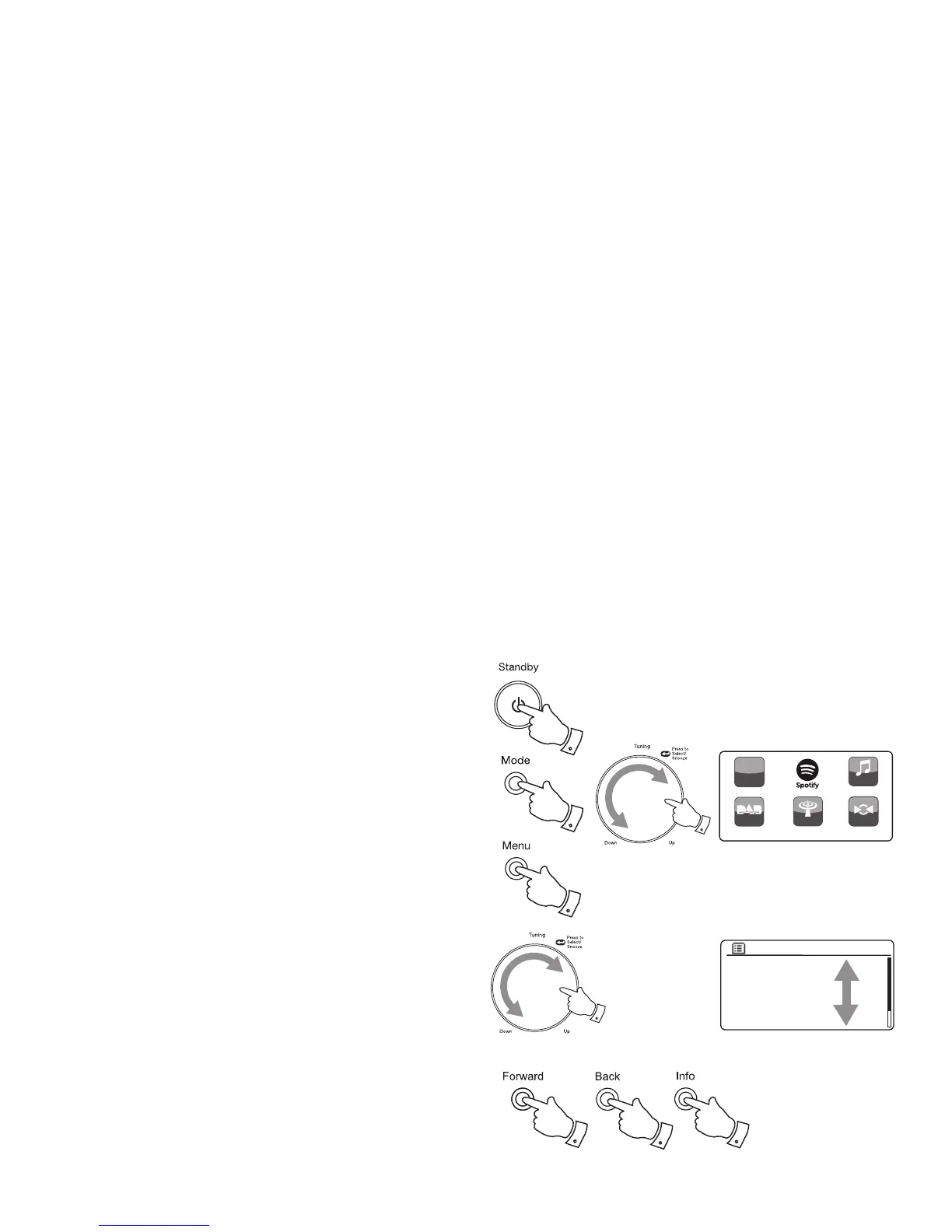
Navigation controls
This page describes the basic means of controlling your Stream 93i sound
system. Instructions for each operating mode are given in the later sections
of this book.
1. Pressing the On/Standby button brings your sound system out of
Standby mode. Pressing On/Standby while the sound system is in use
will cause it to return to the Standby mode with the clock display.
2. Pressing the Mode button gives you access to each of the operating
modes in turn: Internet Radio, Spotify, Music Player, DAB Radio, FM
Radio and Auxiliary Input. Alternatively press the Mode button and then
turn the Tuning/Select control clockwise or anti-clockwise to highlight
the desired menu item then press the control to select that item.
3. Pressing the Menu button will access the menu system.
4. Many operations require the user to make a selection from the menu. This
is done using the Tuning/Select control. Turn the control clockwise or
anti-clockwise to highlight the desired menu item then press the control
to select that item.
If there are more than six items in a menu, then the display will automatically
scroll up or down so that the additional items become visible. A sliding
bar on the right will give an indication showing the current portion of
the menu that is displayed. If there are many items in a menu, then the
sound system allows the menu to 'wrap around' in either direction. This
can make it easier to reach items at the end of a long menu, such as a
list of countries or Internet radio stations.
5. The Forward button may also be used to make selections from the
displayed menu. If an error is made when navigating the menus, it is
generally possible to go back to a higher level menu by pressing the
Back button.
6. The Info button allows the display of information relating to the radio
station or music fi le being played.
Note: In this booklet, press always means press and release. If it is required
to give a long press on a button this is described as press and hold. Although
controls on the sound system are shown, all functions are also available
using the remote control.
4
2
3
5
5
Internet radio
Spotify
Music player
DAB
FM
AUX in
Main menu
1
7
6
2
DAB Radio
My Music
FM Radio
Internet radio
h
t
tp://
Inter net
Radio
AUX


 To Next Page