55
Controlling Spotify on your sound system
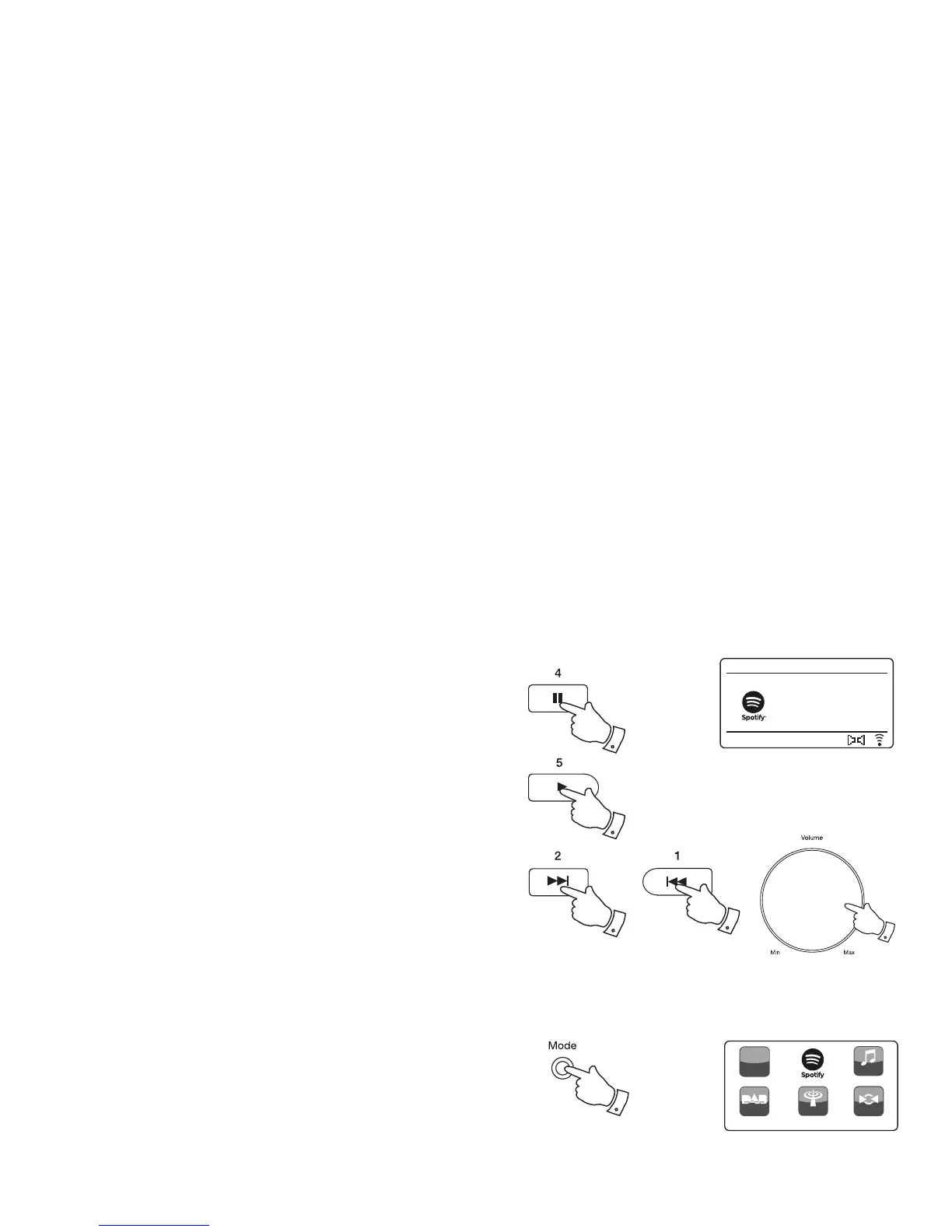
The music can be controlled using the controls on your sound system as
well as by any Spotify enabled device.
1. Press and release the Pause button to pause playback of the current
track.
2. Press and release the Play button, playback will resume from the
point where it was paused.
3. Press the Forward button to start playback of the next track in the
current Spotify playlist.
4. Press the Rewind button to start playback of the previous track in the
current Spotify playlist.
5. Rotate the Volume control to set the required volume level. The volume
may also be controlled from within the current Spotify app.
Artist:
Edgar Froese
Spotify
12:34
Magic Lantern
1
3
5
2
4
DAB Radio
My Music
FM Radio
Spotify Control
h
ttp:
/
/
Inter net
Radio
AUX
1
Using the Mode button to select Spotify
If you have previously connected using the Spotify Connect app you may
select Spotify using the mode button on your sound system.
1. Press the Mode button to select the Spotify mode.
Please note if the power is removed you will need to re-connect Spotify
with your sound system using the app once again.


 To Next Page