If you need any further advice, please call our Technical Helpline on :-
020 8758 0338 (Mon-Fri)
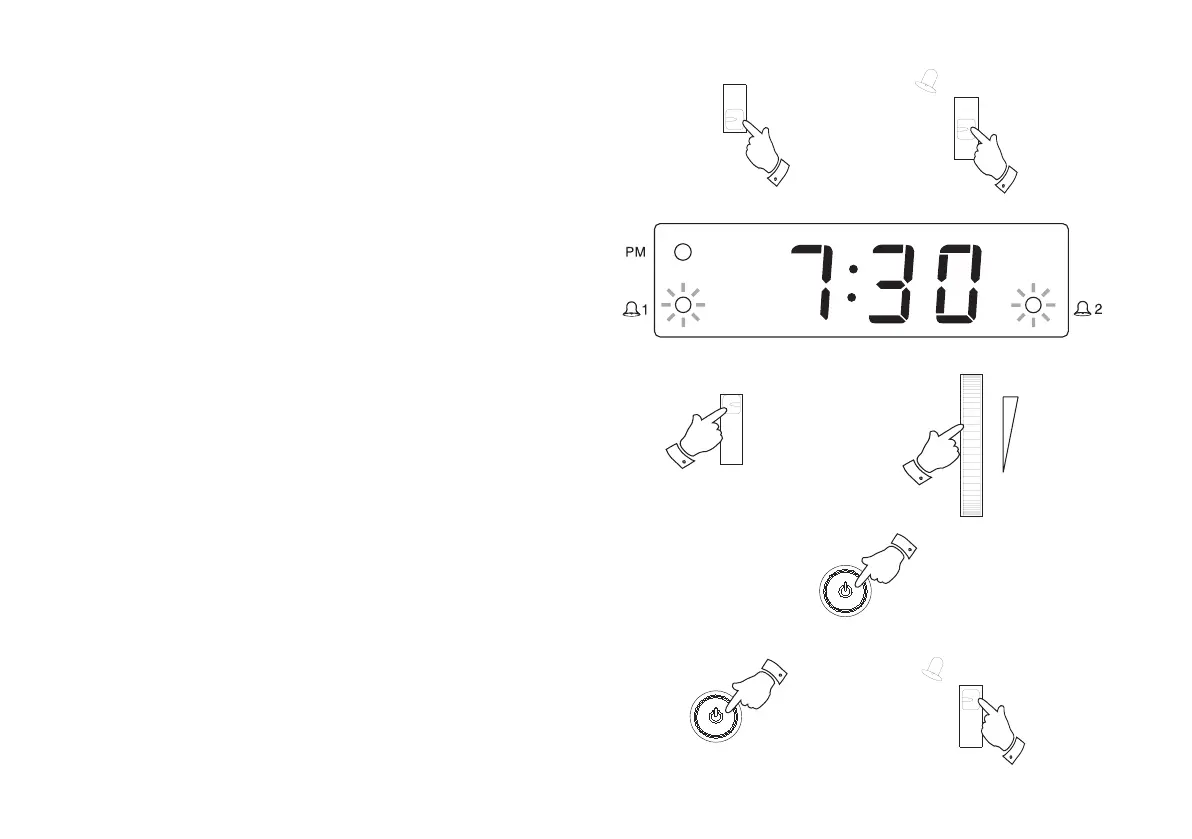
Setting the alarms to wake to CD
1. Set the alarm time as previously described. Set the Alarm Mode
switch to the 'Music' position.
2. Set the Alarm 1 or Alarm 2 function switch to the 'On' position.
The corresponding Alarm indicator will light.
3. Set the Function switch to the 'CD' position, insert a CD and ensure
that the Volume control is set to the desired level.
4. Press the On/Off button to switch off your CD clock radio, the On
indicator will switch off.
Important: Failure to switch off the unit will result in non operation
of the CD at alarm time.
5. The CD will play every day at the preset time for a maximum of 90
minutes. To switch off the alarm until the next day press the On/Off
button.
6. To switch off the alarms permanently set the Alarm 1 or Alarm
2 function switch to the 'Off' position.
16
1
2
3
6
3
5
4
CR9986 Rev 1.pmd 5/19/2005, 8:28 AM17



 To Next Page