11
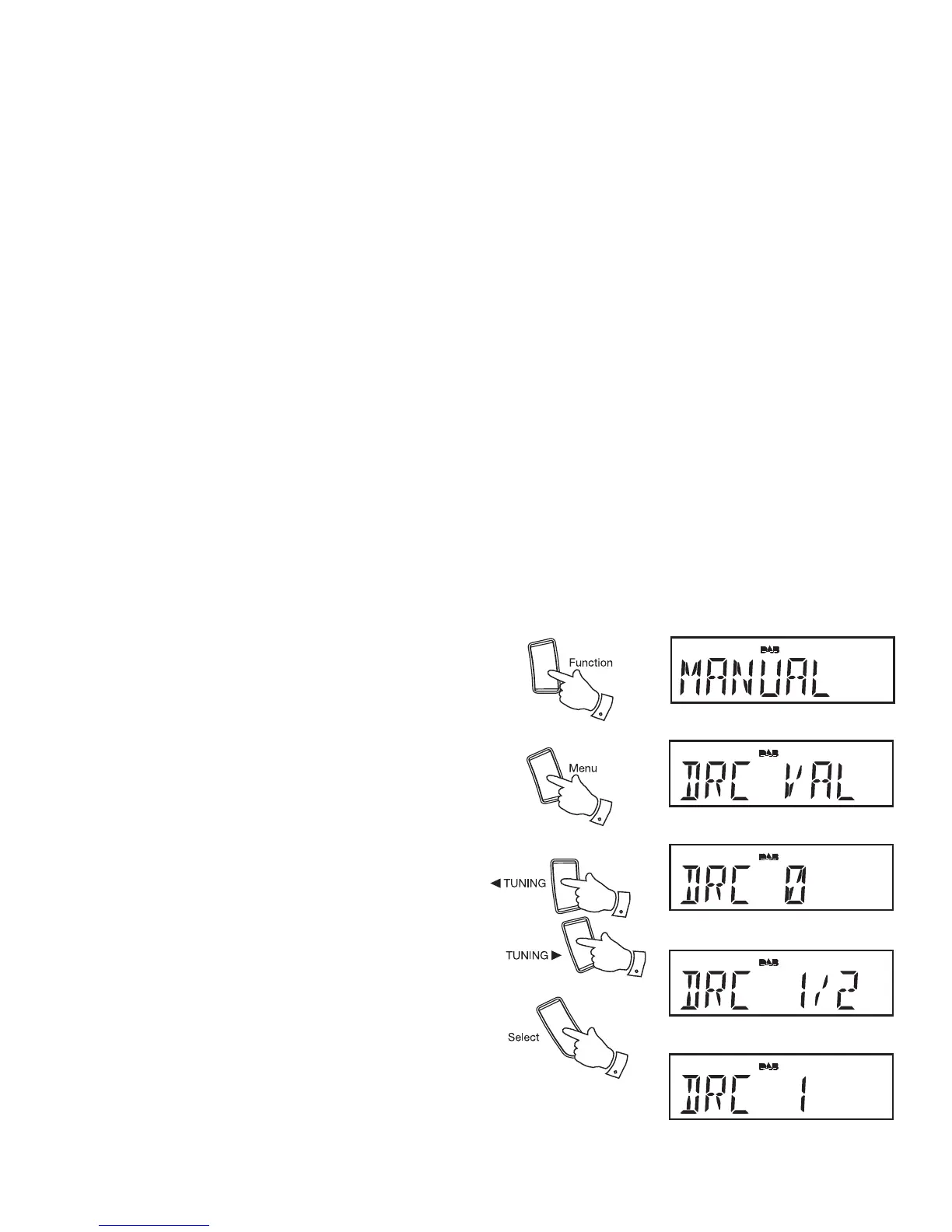
Dynamic Range Control (DRC) - DAB
The DRC facility can make quieter sounds easier to hear when your radio
is used in a noisy environment.
There are three levels of compression:
DRC 0 No compression applied. (default)
DRC 1/2 Medium compression applied.
DRC 1 Maximum compression applied.
1. Press the On / Standby button to switch on your clock radio.
2. Press the Function button to select the DAB band.
3. Press and hold the Menu button until the display shows
“MANUAL.”
4. Press the Tuning Up or Down buttons until "DRC VAL" appears on
the display. Then press the Select button. The display will show the
current DRC value.
5. Press the Tuning Up or Down buttons to select the required DRC setting
(default is 0) .
6. Press and release the Select button to confi rm the setting. The display
will return to the normal radio display.
Note: Not all DAB broadcasts are able to use the DRC function. If the
broadcast does not support DRC, then the DRC setting in the radio will
have no effect.
2
4,6
3
4,5
4,5













 To Next Page