If you need any further advice, please call our
Technical Helpline on 0181 758 0338 (Mon-Fri)
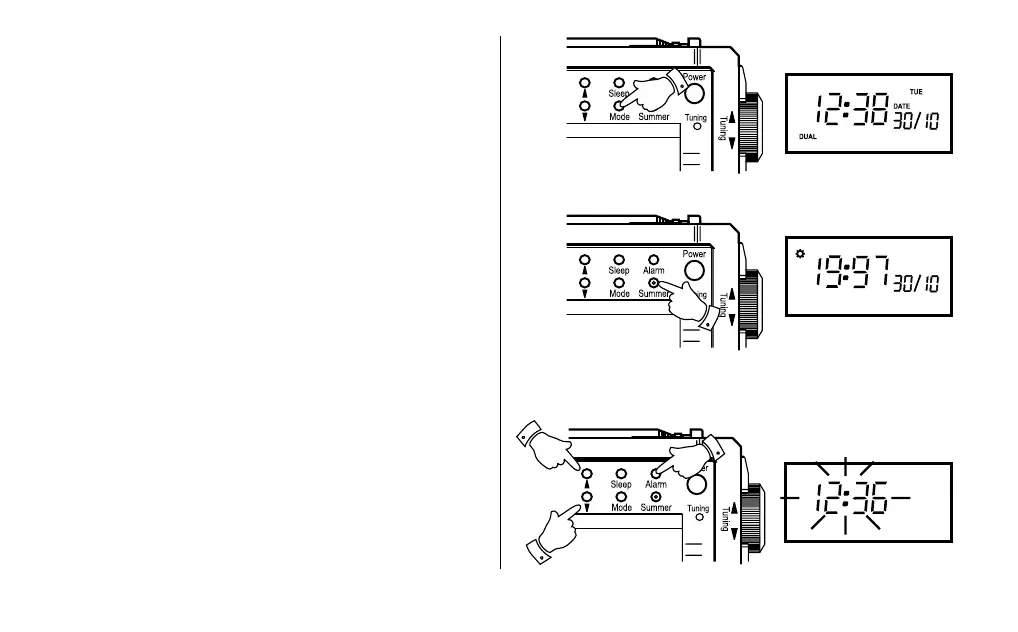
Switching between local and dual time
1. Repeated presses on the “Mode” button will cause the clock
to cycle between local and dual time modes. Dual time mode
is indicated by the word “DUAL” in the clock display.
Switching between summer and winter time
1. Press the “Summer” button briefly to switch between summer
time and winter time.
2. When Summer time is set, the Summer indicator appears in
the display and one hour is added to the time.
3. Summer time can be set for Local time and Dual time
separately.
Setting the alarm time
1. Press and hold the “Alarm” button for at least 5 seconds.
The Alarm time will flash in the display indicating that the
alarm time can be set.
2. Press the “Forward” or “Reverse” buttons until the desired
alarm time is displayed.
3. Briefly press the “Alarm” button to finish the setting process.


 To Next Page