49
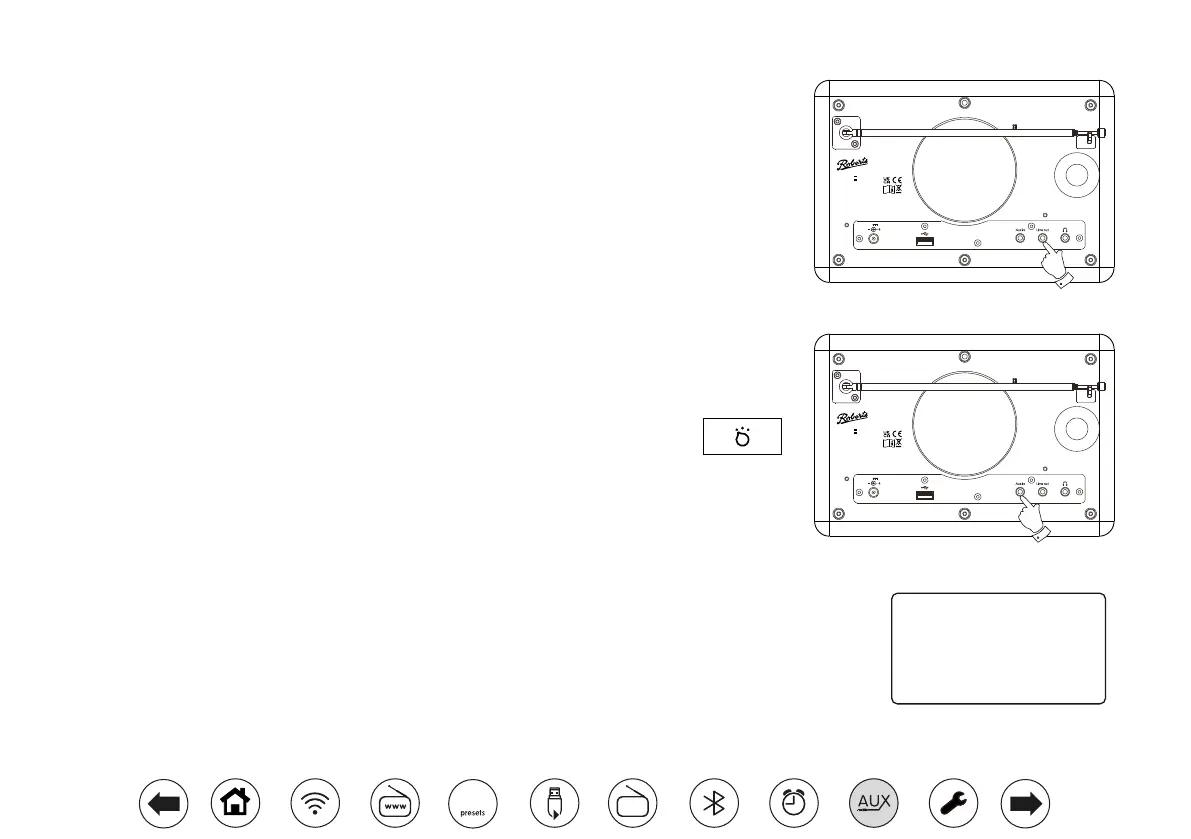
Line out socket (3.5mm Jack)
A 3.5mm Line Out socket located on the rear of your radio is provided for connecting the audio signal
to an external amplier. Inserting an audio cable into this socket will not mute the internal loudspeaker.
Set the volume control on the radio to minimum if desired.
Auxiliary input socket
A 3.5mm Auxiliary Input socket located on the rear of your radio is provided for
connecting the audio signal from an external audio source such as an MP3 or CD player.
1. Connect a stereo lead from the headphone output of your MP3 or CD player to
the Aux In socket located at the rear of the radio. Typically this lead will have a
3.5mm stereo plug at both ends.
2. Switch on your radio and press the Mode button until AUX in mode is shown on
the display.
3. Press 'play' on the connected audio device. If you are using its headphone output
for the connection, set its volume control to a level of somewhere between two-
thirds and maximum (the objective is to get a strong audio signal but without too
much distortion). Then adjust the volume on the radio as required.
Note, if using an iPod as the sound source, you may need to set its output to
maximum to get an adequate audio signal level.
4. After use, disconnect your player in order to listen to your radio conventionally.
Inactive Standby feature
In order to minimise its energy consumption when not in use, your radio includes an automatic Inactive
Standby feature. This is designed to put your radio into standby if it detects that it is no longer being
used in the following circumstances.
Internet radio – streaming is stopped;
Streaming Services – streaming is stopped; Aux-in / Bluetooth – there is no audio input signal
If any of these conditions is detected for more than 10 minutes then the radio will start a 5 minute countdown
before entering standby. The display will show the time remaining. After 15 minutes of inactivity the radio
will enter standby with the clock being displayed.
Pressing any button or resuming listening during the 15 minute period will reset the standby timer.
Standby in 5 minutes
Please press
any button to cancel.
DC 12V 2.5A
Stream 94L
DC In:
USB:
Roberts Radio Ltd, Stoney Lane,
Whiston, Prescot, L35 2XW, UK
Glen Dimplex Europe Ltd,
Airport Road, Cloghran,
Co. Dublin, K67 VE08,Ireland
Designed & Engineered in the UK, Made in China
12V 2.5A
5V 500mA
READ
SAFETY GUIDE
DC 12V 2.5A
Stream 94L
DC In:
USB:
Roberts Radio Ltd, Stoney Lane,
Whiston, Prescot, L35 2XW, UK
Glen Dimplex Europe Ltd,
Airport Road, Cloghran,
Co. Dublin, K67 VE08,Ireland
Designed & Engineered in the UK, Made in China
12V 2.5A
5V 500mA
READ
SAFETY GUIDE
DAB
60














 To Next Page