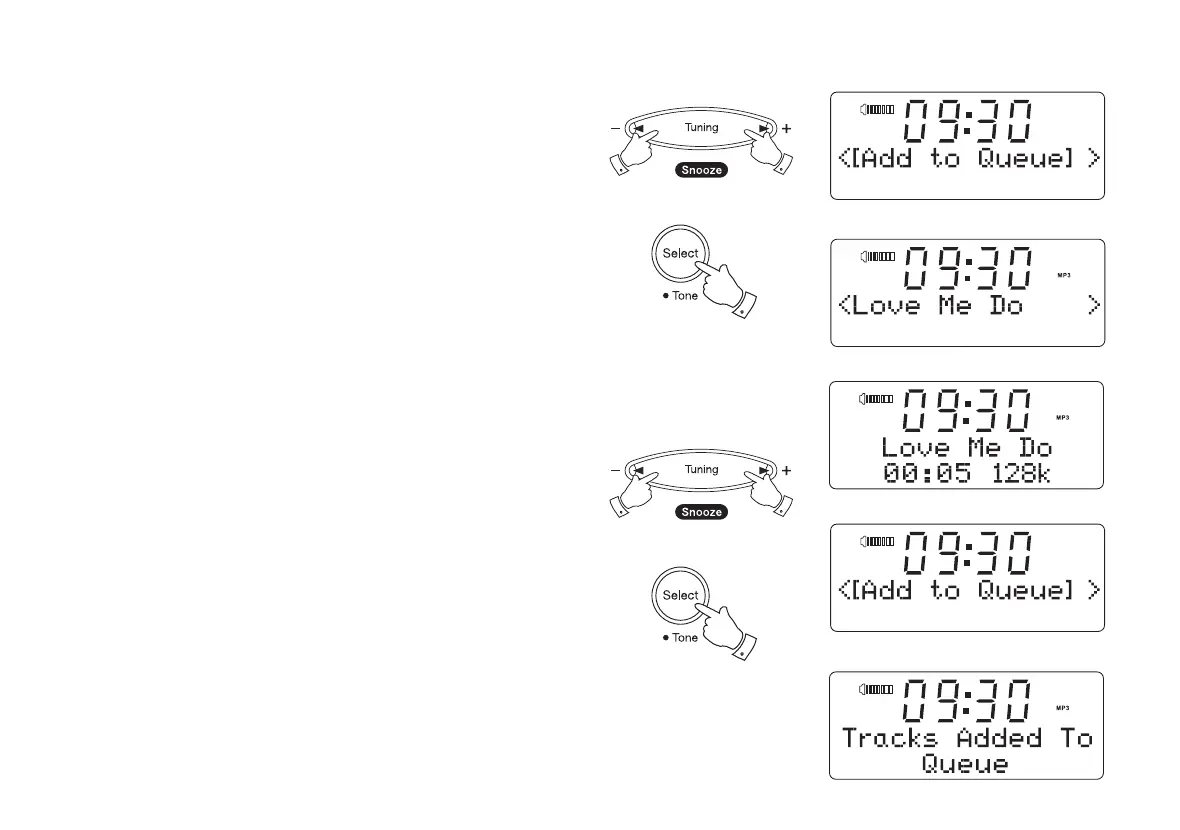
Listening to a single track
1. If you wish to play only a particular track from an album, fi rst choose
the album as described in steps 1 - 3 on the preceding page (section
'Listening to a complete album').
2. '[Add to Queue]' will show on the display at the head of a list of
tracks.
3. Press the Tuning Up or Down button until the required track is
displayed.
4. Press and release the Select button. The track will begin playing.
Queuing up albums for playback later
While the Media Player is playing, you may add additional albums or
tracks to the media queue.
1. Use the Tuning Up or Down buttons (with the back button as needed)
to search for and display the required album.
2. Press the Select button to choose the album. The list of tracks for the
album will be displayed, headed by '[Add to Queue]'.
3. If needed, press the Tuning Up or Down buttons so that '[Add to
Queue]' is displayed. Press and release the Select button. 'Tracks
Added to Queue' will be displayed.
31
3
3
4
1,3
1,3
2-3











 To Next Page