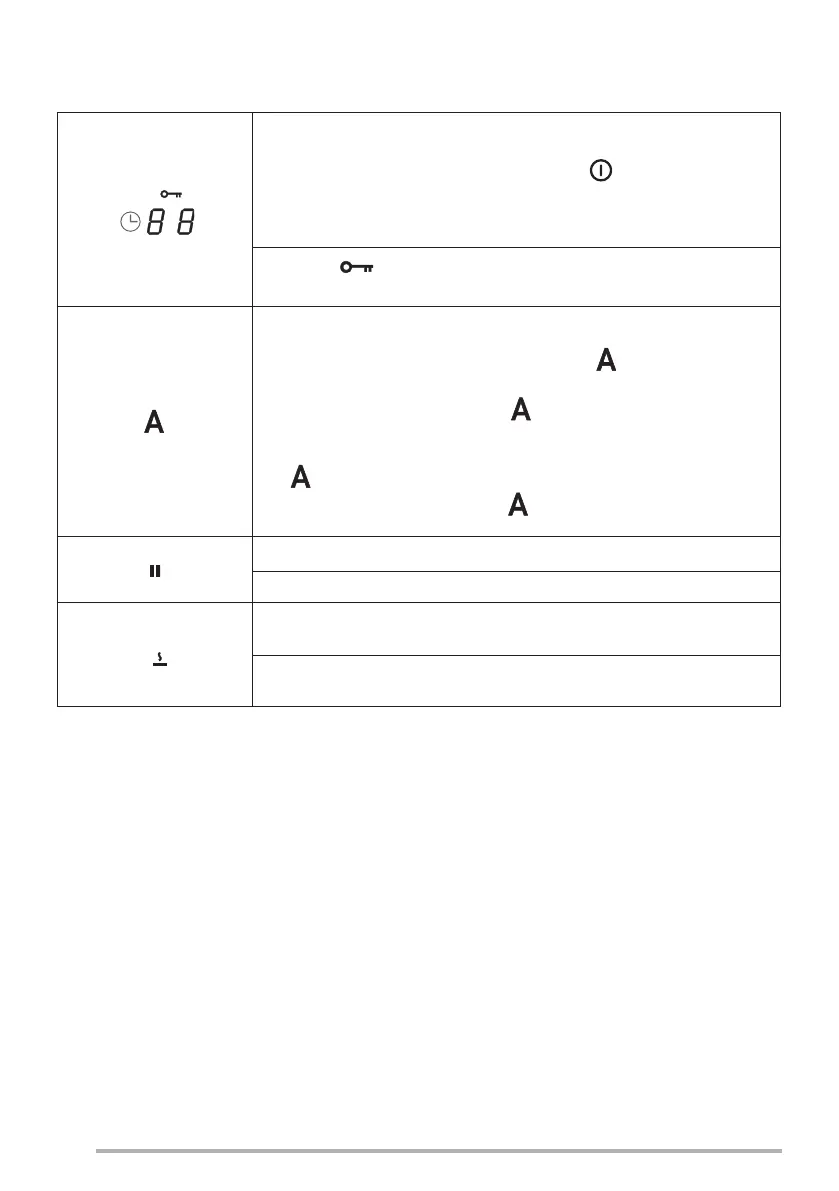
Selecting Timer controls
Press and hold the On/Off button for 2 seconds .
Select the controls areas used to manage the cooking area Timers and the
suction hood, which normally display “C L” (see the Timer functions).
The symbol indicates the safety functions button see “Keyboard Lock
(cleaning)”.
The standard setting when the hob/suction hood is switched on is for the
hood to start up in automatic mode with the LED brightly lit. The Hood
comes into operation if the power in the cooking areas is greater than “1”.
It is deactivated by pressing the LED which changes intensity from
bright to dim in confirmation. It can also be deactivated by pressing a value,
higher than “1”, on the power bar, which is confirmed by the fact that the
LED changes intensity from bright to dim.
It is reactivated by pressing the LED which changes to brightly lit.
PAUSE and RESTART function.
When used in combination with other buttons this accesses the user menu.
The Defrost function defrosts food or gently melts butter, chocolate or honey, etc.
When used in combination with other buttons this accesses the installer menu.
38


 To Next Page