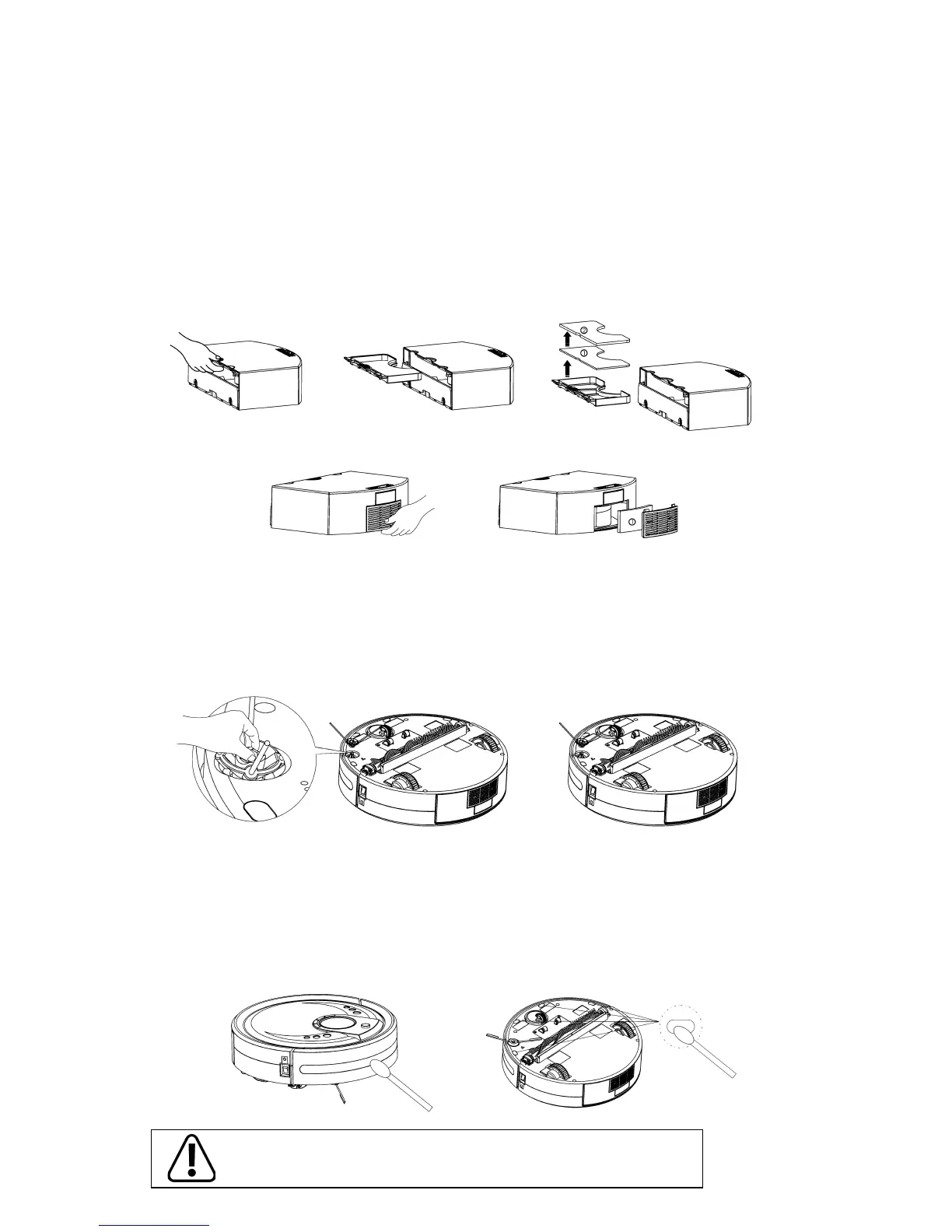
Cleaning Sensors
- The sensors should be cleaned by cotton swab or soft cloth.
- There are wall-following sensors installed in the front of bumper of the Robomaid RM-770, and ground
detection sensors installed under the RM-770 (see the gure below)
To ensure a more eective cleaning of the Robomaid RM-770, please
clean the sensors regularly.
How to Replace and Clean the Filters
Removal and Cleaning of Filters:
- Hold the middle part of the lter tray located on the inside of the dustbin (See gure 1) and then
slide out (See gure 2).
- The lters will easily lift out (See gure 3)
- Unclip the rear iter grill (See gure 4).
- Take out the lter inside (See gure 5).
- The lters can be cleaned in water and then reused after drying. It’s recommended to clean and
replace them regularly.
- Install the 2 large lters onto the lter tray then slide it into the dustbin. Install the softer lter rst. (Figure 1)
- First install the lter in the lter grill (Figure 5), and then insert the top end into the dustbin, and then clip
the lower end in place.
Figure 1 Figure 2
Figure 3
Figure 4 Figure 5
Side Brush
- To remove, nip the two fasteners of the side brush with one hand (see Figure 1) and pull the side
brush upward with the other hand to take it out.
- To Install, align the side brush with the 2 fasteners and press it down to clip in the side brush (See
Figure 2)
Figure 1
Figure 2
Installation of Filters:


 To Next Page