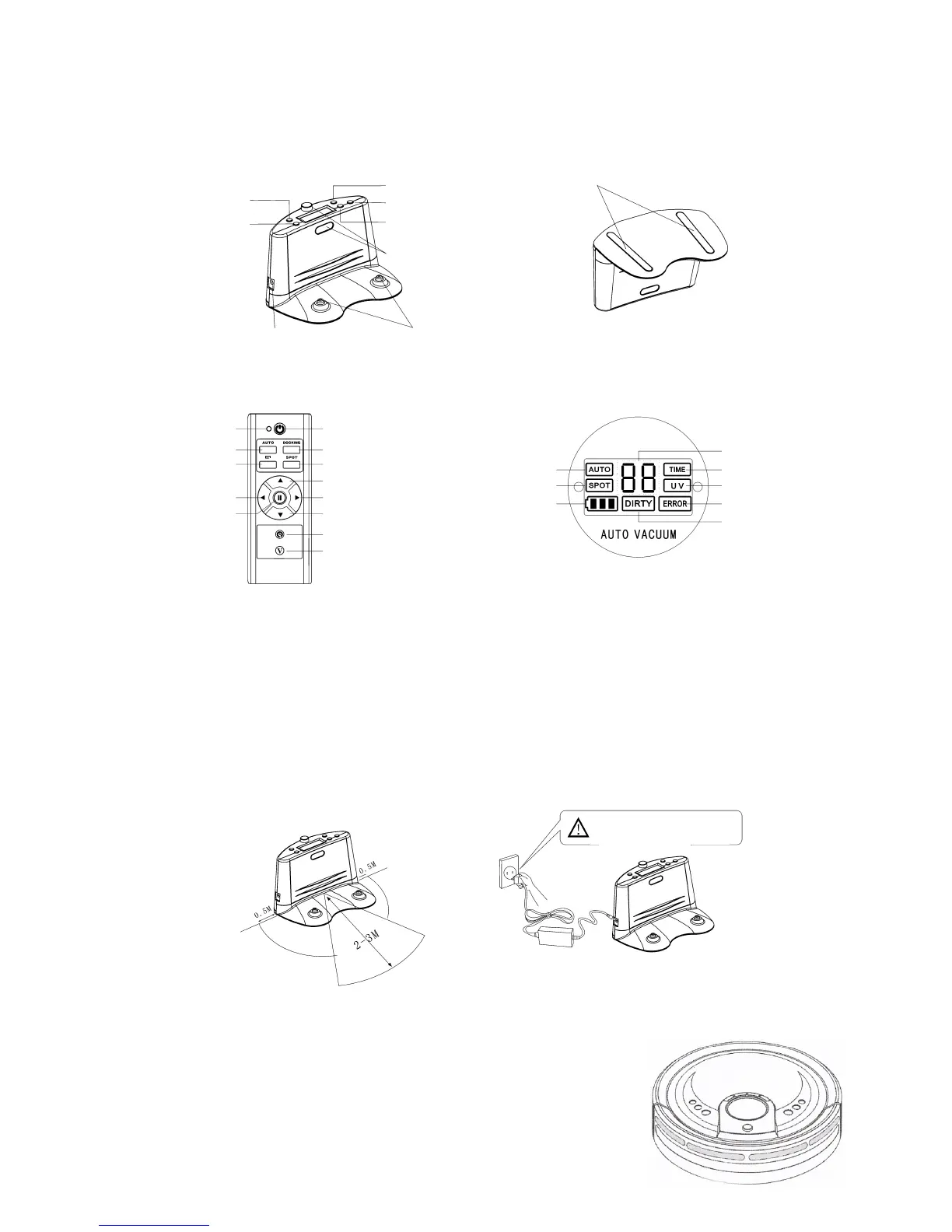
Names of Parts
Docking Station
On/O Button
Infrared Transmitter
Power Adaptor Socket
Charging Terminals
Skidproof Floor Pads
Full Go Button
Clock Button
Adjust Button
Timer Button
Remote Control LED Display / Control Panel
Indicator
Speed Adjuster
Auto Indicator
Dirt indicator
Digital display
Time Indicator
UV Indicator
Error indicator
Battery Power / Docking
Spot Indicator
Pause
Left
Wall-Following Button
Auto Button
On/O Button
Docking Button
Spot Clean Button
Forward
Right
Backward
UV button
Setting Up The Docking Station
- Place the Docking Station on level ground with the back against a wall.
- Make sure that there are no obstacles or uneven ground in the area within 3 meters in front of
the Docking Station and 0.5m toward the left and right of it. (See gure 1)
- Ensure that Infrared Transmitter on the Docking Station is clean, free from dust and uncovered,
otherwise, the Robomaid RM-770 may not automatically recharge correctly.
- Connect the Power Adaptor to the Power Socket of the Docking Station. (See gure 2)
- Tidy up any electric wires along the wall to avoid obstructing the operation of the Robomaid.
- Avoid placing the docking station near year TV or other wireless-based device.
- Never place the docking station near the top of a stair case or ledge, as the Robomaid RM-770 will
reverse away from the docking station.
Please take care when plugging in
Power Adaptor!
2 erugiF1 erugiF
Indicator
Furniture Protection Adhesives
- If the Robomaid does not detect an object in front of it, it will use the
bumper to recognise the object and change direction. To further protect
your furniture and other obstacles, you can stick the furniture protection
adhesives on the bumper of the Robomaid where appropriate.
- Please ensure the adhesives do not cover the red sensor strip on the
front bumper as shown to the right.
- Please note that once stuck on, the adhesives are very dicult to remove.


 To Next Page