27
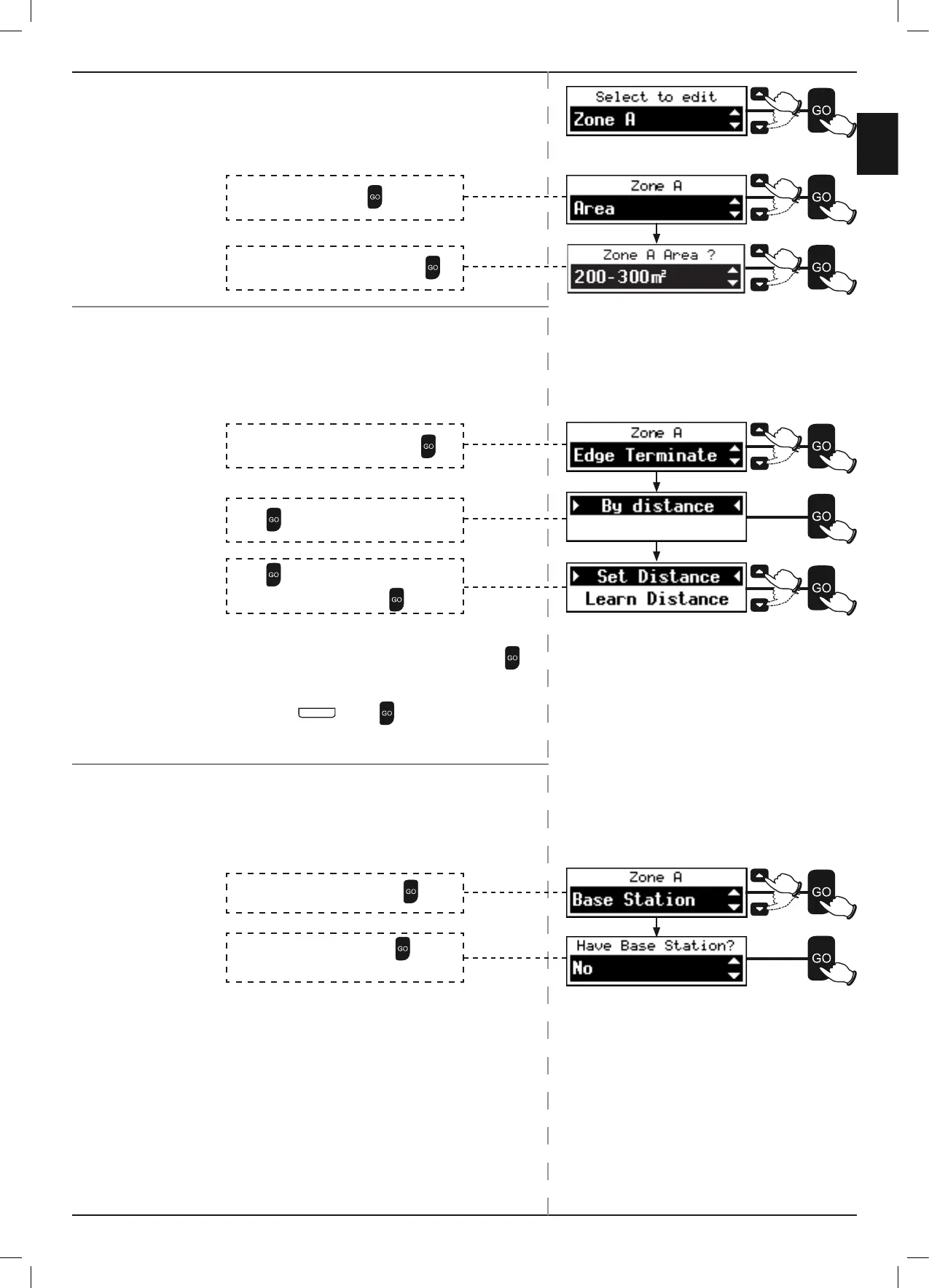
To edit a Separated Zone:
The following can be changed for a Separated Zone: Area, Edge
Terminate and Base Station.
P To change the Area of a Separated Zone:
Edge Terminate indicates to Robomow how far to mow the edge
before starting to mow the inner lawn.
P To change the Edge Terminate settings of a Separated Zone:
There are two methods of updating Edge Terminate:
Set Distance and Learn Distance.
) Set Distance:
) Learn Distance:
o Place Robomow facing the Perimeter Wire. Press .
Robomow will follow the Perimeter Wire.
o When Robomow has completed a full turn around the
Edge, press
S T O P
. Press to allow Robomow to
Learn the Distance.
If an additional Base Station has been added to a Separated
Zone, Base Station has to be set to Yes.
P To change the Base Station setting of a Separated Zone:
Scroll to select Base Station. Press .
Scroll to select Edge Terminate. Press
.
Press
to select By Distance.
Press
to select Set Distance.
Scroll to enter a Distance. Press
.
Scroll to select Yes and No. Press
.
Yes = an additional Base Station.
Scroll to select Area. Press
.
Scroll to select the new area size. Press
.


 To Next Page