32
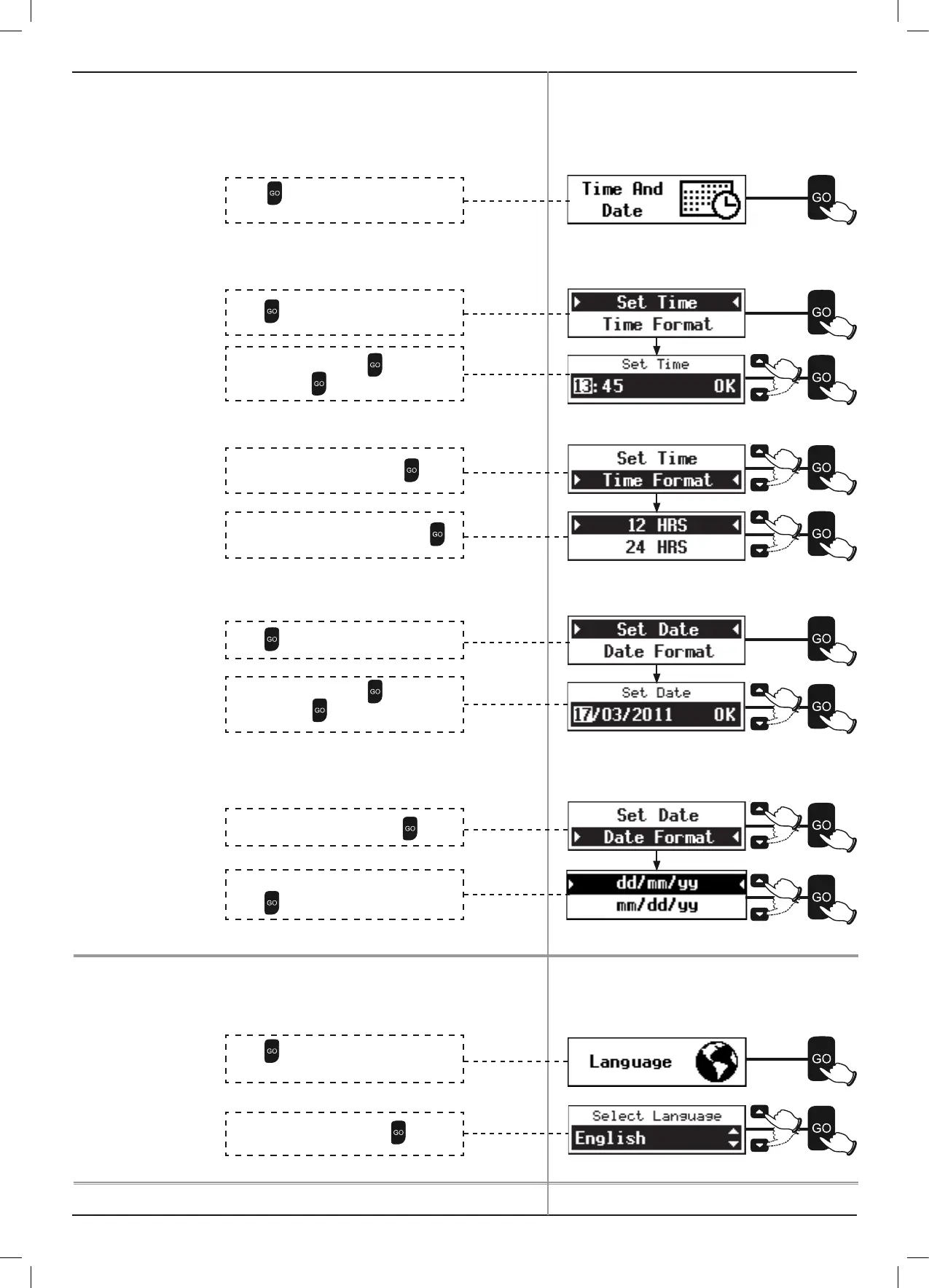
4.4.4 Time And Date
Time And Date have already been set during the One-Time Setup.
They can be updated using the Time And Date option.
P To Set Time
P To change Time Format
P To Set Date
P To change Date Format
4.4.5 Language
P To change Language
Press to select Time and Date from the
Mower Options menu.
Press
to select Set Time.
Scroll to set the Time. Press
to move to
next digit. Press
to OK.
Scroll to select Time Format. Press
.
Scroll to select 12 HRS or 24 HRS. Press
.
Press
to select Set Date.
Press
to select Language from the Mower
Options menu.
Scroll to set the Date. Press
to move to
next digit. Press
to OK.
Scroll to select Date Format. Press
.
Scroll to select dd/mm/yy or mm/dd/yy.
Press
.
Scroll to select Language. Press
.



 To Next Page