38 39
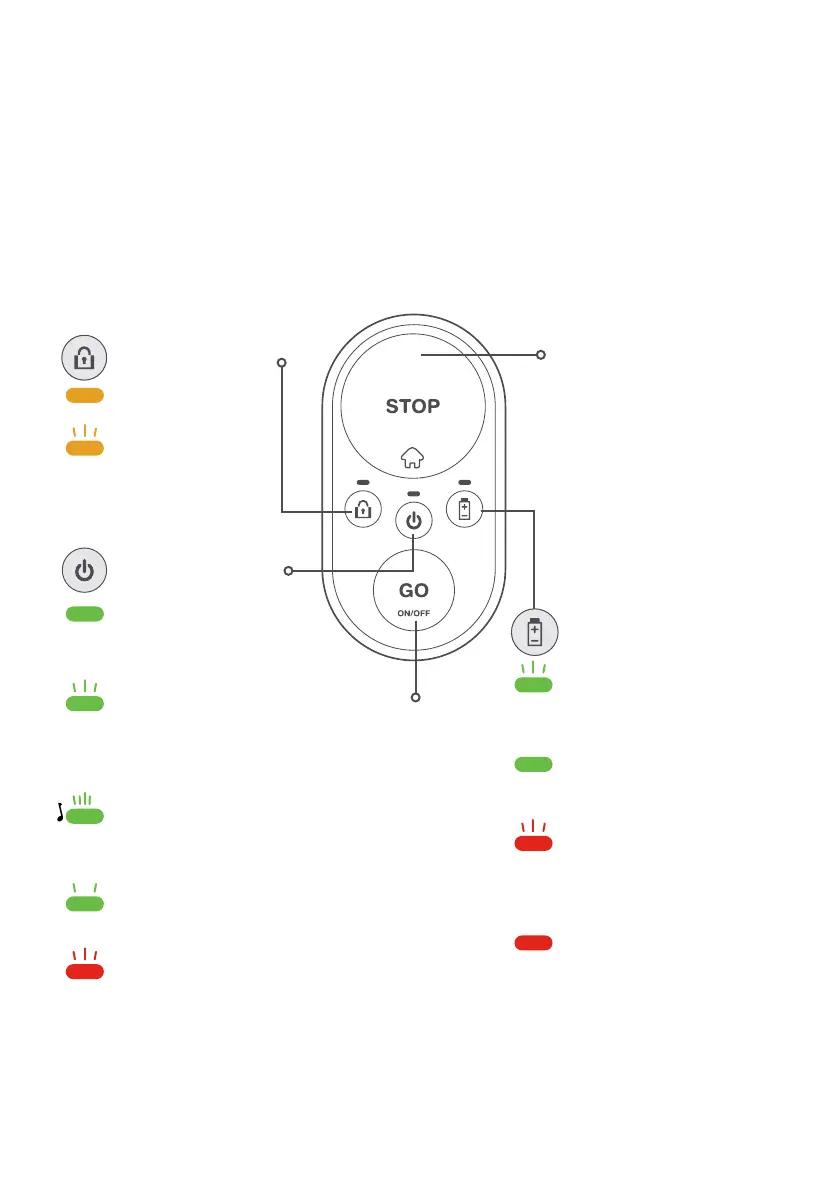
Operating panel
STOP / Home
button
Lock indication:
Steady orange: child
protection is active
Blinking orange: theft
protection is active
ON-OFF indication:
Steady green: mower is
switched on / mower is in
operation
Blinking green: mower is
returning to the Base Station /
mower is driving to a starting
point
Blinking green fast (and
beeping): mower is departing
from Base Station
Blinking green slow: mower is
asleep
Blinking red / steady red:
mower is at fault (see
troubleshooting section)
GO / ON-OFF
switch
Battery indication:
Blinking green: mower is
charging in the base
Steady green: the battery is
fully charged
Blinking red: the battery is
almost empty, recharging
will soon be required
Steady red: the battery is low
and needs to be recharged to
resume operation
Green
Orange
Orange
Green
Green
Red
Red
Green
Green
Green
Red



 To Next Page