Appendices
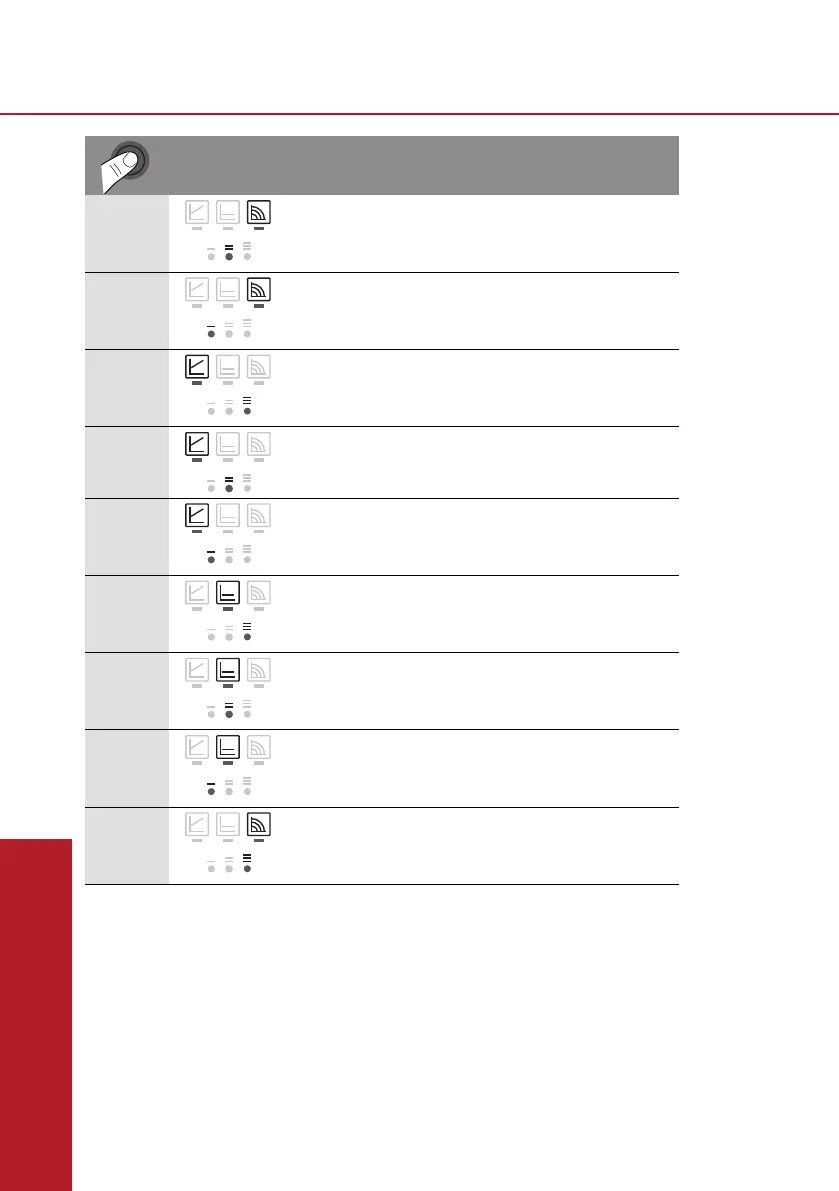
• Pressing the button for the 9th time returns to the factory setting (constant speed /
pump curve II).
Activating factory setting
The factory setting is activated by pressing and holding the operating button whilst switching
off the pump.
• Press and hold the operating button for at least 4 seconds.
-AllLEDsashfor1second.
-TheLEDsforthelastsettingashfor1second.
When the pump is switched on again, the pump runs using the factory settings (delivery
condition).
Installation and operating instructions Wilo-Para 47
en
• Pressing the button for the 9th time returns to
the basic setting (constant speed / characteristic
curve III).
LED display Control mode Pump curve
1 Constant speed
II
2 Constant speed
I
3 Variable differential
pressure
Δp-v
III
4 Variable differential
pressure
Δp-v
II
5 Variable differential
pressure
Δp-v
I
6 Constant differential
pressure
Δp-c
III
7 Constant differential
pressure
Δp-c
II
8 Constant differential
pressure
Δp-c
I
9 Constant speed
III
factory setting



 To Next Page