20
To pair the headphones to the docking station:
1 Set the HUB switch on the docking station to ENABLE if this is your first
Rocketboost™ product set.
2 Press and hold the CONNECT button on the docking station for more than
three seconds to put it into pairing mode. The power indicator starts
blinking rapidly and the unit will stay in pairing mode for 30 seconds.
3 Press and hold the CONNECT button on the headphone for more than
three seconds so the docking station and headphone enter pairing
mode.
• The power indicators light steadily if the pairing was successful.
• The power indicators blink slowly if the pairing was not successful.
Pairing the headphones and docking station to an existing
Rocketboost network
Use this procedure only if you are adding this product to an existing
Rocketboost network.
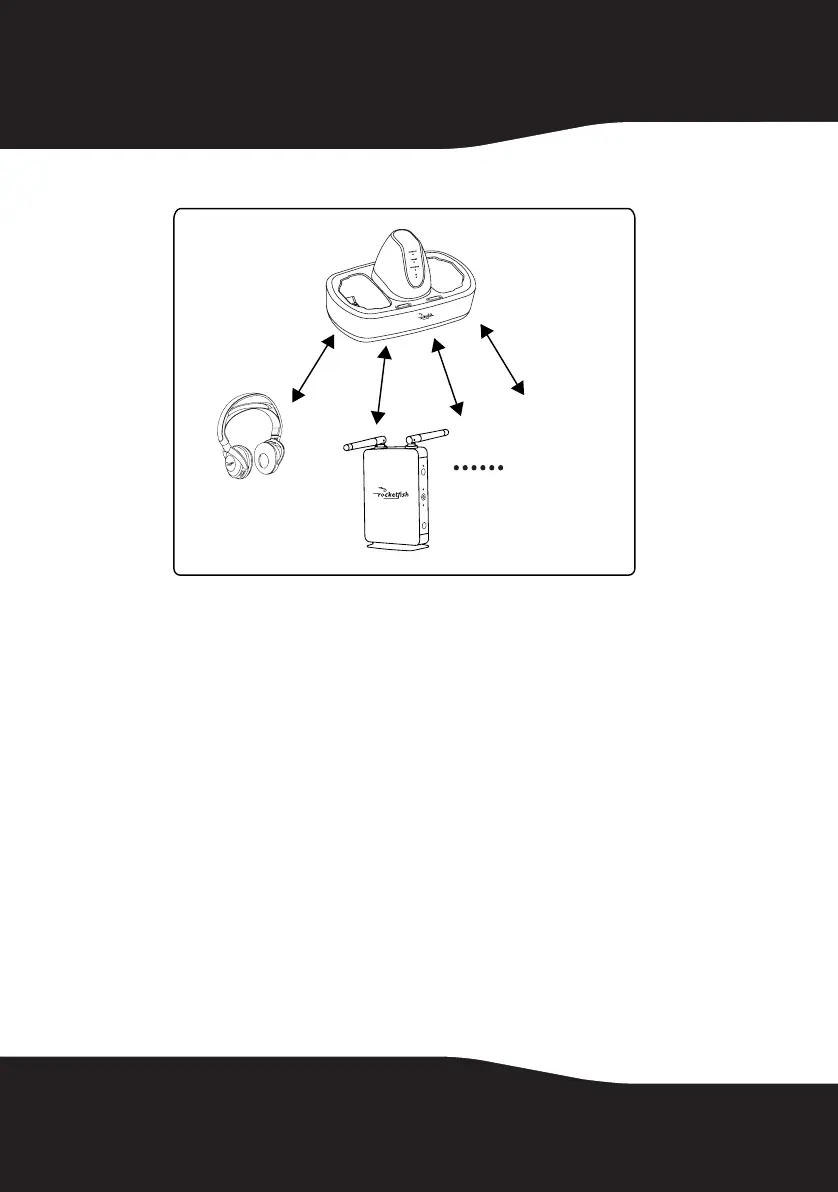
You need to pair both the docking station and the headphone to
your existing hub device, using the following steps.
Docking station
(HUB: ENABLE)
Rocketfish sender/receiver
RF-RBUSB (HUB: DISABLE)
Headphones
+ other Rocketfish
devices.
RF-RBWHP01_11-0883_MAN_V2.fm Page 20 Tuesday, October 18, 2011 11:04 AM



 To Next Page