EasyManua.ls Logo

RocketFish RF-WHP02 - User Manual

RocketFish RF-WHP02
28 pages
Print Icon
To Next Page IconTo Next Page
Loading...
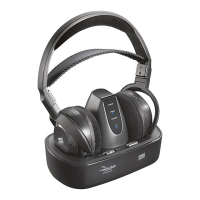
Digital Wireless Stereo
Headphones
Description [French]
Description [Spanish]
RF-WHP01/02
User Guide Guide de l’utilisateur Guía del Usuario

Questions and Answers

RocketFish RF-WHP02 Specifications

General IconGeneral
TypeOver-Ear
ConnectivityWireless
Wireless TechnologyBluetooth
Impedance32 ohms
Frequency Response20 Hz - 20 kHz
Battery Life10 hours
Charging Time2 hours

Summary

Introduction

Product Overview

Brief introduction to the digital wireless stereo headphones.

Safety Information

Safety Symbols and Warnings

Explanation of safety symbols and warning statements for product use.

Safety Precautions

General Safety Precautions

Important safety guidelines for product operation and environment.

Features and Package Contents

Product Features

Key features of the wireless stereo headphones.

Package Contents

List of items included in the product packaging.

Headphones Identification

Headphones Back Components

Identification of components on the back of the headphones.

Front Views Identification

Headphones Front and Side Components

Identification of headphone controls and indicators.

Docking Station Front Indicators

Identification of indicators on the front of the docking station.

Docking Station Back Panels

WHP01 Docking Station Back Ports

Identification of ports on the back of the WHP01 docking station.

WHP02 Docking Station Back Ports

Identification of ports on the back of the WHP02 docking station.

Docking Station Top (WHP01)

WHP01 Docking Station Top Components

Identification of components on the top of the WHP01 docking station.

Docking Station Top (WHP02)

WHP02 Docking Station Top Components

Identification of components on the top of the WHP02 docking station.

Setting Up Your System

Connecting to A;V Receiver with External Amplifier

Guide for connecting the system to an A/V receiver via an external amplifier.

Connecting to A;V Receiver

Connecting to A;V Receiver (CD;DVD Player)

Procedure for connecting to A/V receiver using audio output jacks.

Connecting to Amplifier

Connecting Docking Station to Amplifier

Guide for connecting the docking station to amplifier audio input jacks.

System and Microphone Connections

Connecting to A;V Receiver (Internal Amplifier)

Connecting the system to an A/V receiver with an internal amplifier.

Connecting the Microphone (WHP02 Only)

Setting up the microphone for WHP02 for TV audio.

Microphone and AC Adapter Setup

Microphone Connection Procedure

Steps for attaching the microphone to TV and connecting to the docking station.

AC Adapter Connection Procedure

Steps for connecting the AC adapter to the docking station and wall outlet.

Using Your System: Battery Installation

AC Adapter to Docking Station and Wall Outlet

Connecting the AC adapter to the docking station and power outlet.

Installing or Replacing Headphone Batteries

Guide on how to install or replace batteries in the headphones.

Using Your System: Battery Charging

Headphone Battery Installation Procedure

Detailed steps for installing batteries into the headphone ear pieces.

Charging the Headphones

Instructions for charging the wireless headphones on the docking station.

Using Your System: Establishing Wireless Link

Headphone Charging Procedure

Procedure for charging headphones and indicator light status.

Establishing a Wireless Link

Steps to establish a connection between headphones and docking station.

Using Your System: Link Setup Details

WHP02 Wireless Link Setup

WHP02 specific steps for setting up the wireless link.

WHP01 Wireless Link Setup

WHP01 specific steps for setting up the wireless link.

Low Headphone Power Indicator

Understanding the low power indicator on the headphones.

Listening to Headphones

Active Link Indicator Status

Status indicators for an active wireless link between devices.

Listening Procedure

Steps to follow for listening to audio through the headphones.

Audio Playback and Adjustments

Audio Playback and Volume Adjustment

Playing audio and adjusting headphone volume to a comfortable level.

Volume and Sound Effects Control

WHP01 Volume Control

Adjusting the audio source volume using the docking station knob.

WHP02 Sound Effects

Activating and selecting sound effects on WHP02 headphones.

System Power and Maintenance

Turning Off the System

Procedure for safely powering down the headphones and docking station.

Maintaining Your System

Guidelines for cleaning and maintaining the product to ensure longevity.

Troubleshooting

Troubleshooting No Sound Issues

Solutions for problems where no audio is heard from the headphones.

Troubleshooting Sound Interference

Solutions for audio interference and poor signal quality.

Troubleshooting Communication Issues

Solutions for problems with wireless communication between devices.

Specifications

Technical Specifications

Detailed technical specifications of the Rocketfish headphones.

Legal Notices

FCC Compliance Information

FCC Part 15 compliance statement and warnings.

EU Equipment Disposal Information

Information for disposal of old equipment in the European Union.

Equipment Disposal Information

General Disposal Guidelines

Guidelines for proper disposal of electrical and electronic equipment.

Disposal in Other Countries

Disposal instructions for countries outside the European Union.

1 Year Limited Warranty

Warranty Coverage Period and Terms

Details on the warranty period and what the manufacturer's warranty covers.

Warranty Service and Exclusions

How to Obtain Warranty Service

Procedure for obtaining warranty service and checking warranty validity.

What the Warranty Does Not Cover

List of items and conditions not covered by the product warranty.

Warranty Exclusions and Limitations

Exclusions from Warranty Coverage

Specific exclusions from the product warranty coverage.

Liability Limitations and Disclaimers

Information on liability limitations and disclaimers related to the warranty.

Related product manuals