17RF-WHP01/WHP02
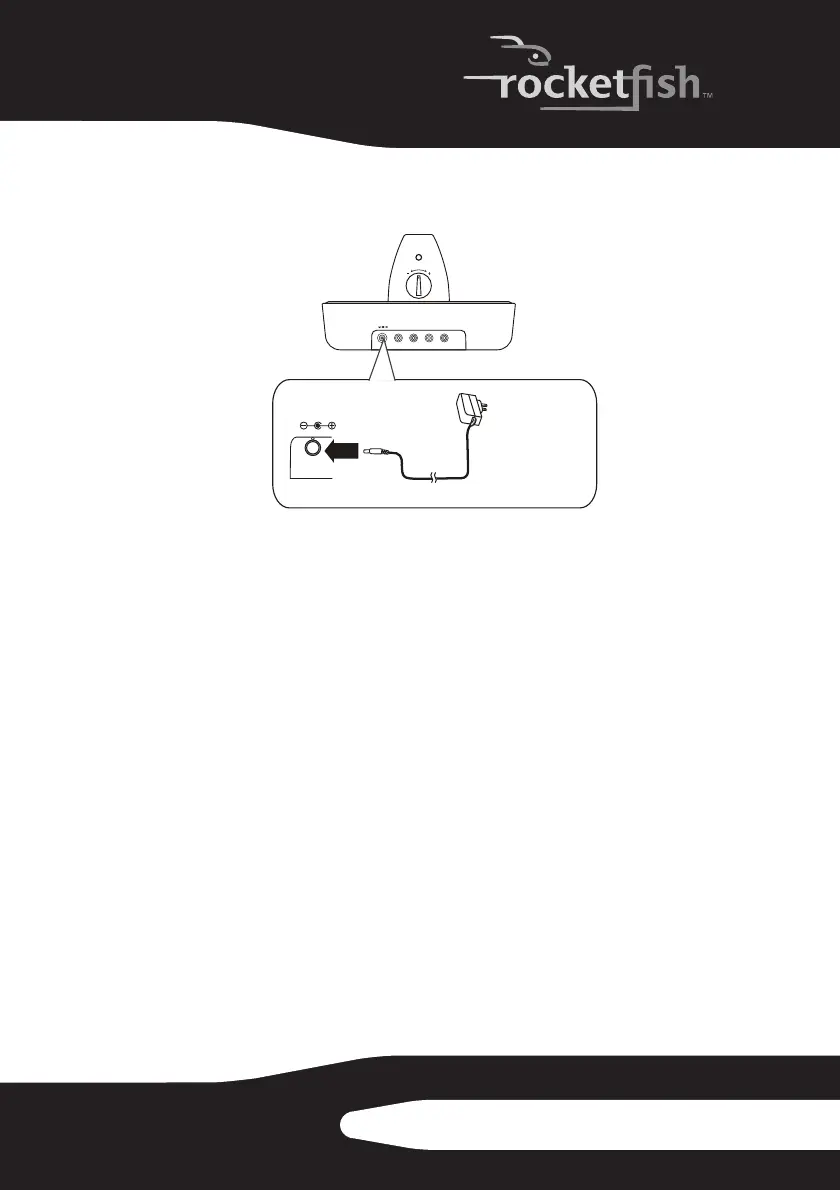
To connect the AC adapter to your docking station:
1 Connect the AC adapter connector to the docking station DC IN jack.
2 Connect the AC adapter plug to a wall outlet.
Caution: Plug the AC adapter into the wall outlet only after all other connections are
completed.
Using your system
Installing or replacing headphone batteries
The headphones are powered by two AA rechargeable batteries. One
battery is housed in the left earpiece and one battery is housed in the
right earpiece.
Notes:
• Do not install non-rechargeable batteries.
• Make sure that all batteries are installed correctly.
CONNECT
RL
AUX INPUT
RL
AUX OUTPUT
DC IN
5V
VOL
DC IN
5V
Docking station
back panel
Connect to wall
outlet



 To Next Page