
EasyManua.ls Logo

RockJam RJMK25 - User Manual

RockJam RJMK25
107 pages
Print Icon
To Next Page IconTo Next Page
Loading...
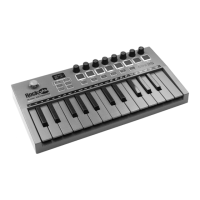
RJMK25 25-Key MIDI Keyboard Controller
RJMK25 Contrôleur de clavier MIDI à 25 touches
RJMK25 25-Tasten-MIDI-Keyboard-Controller
RJMK25 Tastiera controller MIDI a 25 tasti
RJMK25 Controlador de teclado MIDI de 25 teclas
RJMK25 25-klawiszowy kontroler klawiatury MIDI
User Guide
Mode d'emploi
Benutzerhandbuch
Guida utente
Guía del usuario
Podręcznik użytkownika

Table of Contents

Questions and Answers

  • D
    Danielle BeasleyAug 7, 2025
    What to do if the RockJam Controller doesn't respond in the tablet app?
    • S
      staffordjuanAug 7, 2025
      If the app on your tablet isn't responding to key presses on the RockJam Controller, try exiting or force-closing the app. Then, restart the app and re-establish the MIDI connection, either through the app's Bluetooth settings or with a wired connection.
  • C
    clinebiancaAug 12, 2025
    Why is my RockJam Controller behaving erratically?
    • L
      lynnaaronAug 13, 2025
      If your RockJam Controller is behaving erratically or its output is intermittent, it might be due to a low internal battery. Please recharge the device for about an hour to restore consistent operation.
  • K
    Kimberly GarciaAug 19, 2025
    Why can't I connect RockJam Controller via Bluetooth in my device's settings?
    • B
      bcontrerasAug 19, 2025
      Bluetooth MIDI connection for the RockJam Controller needs to be made from within an app that supports Bluetooth MIDI, such as ‘Garageband’. It cannot be established directly from your device's Bluetooth settings.
  • R
    Ronald JonesAug 26, 2025
    What to do if sustain pedal doesn't work with RockJam Controller?
    • R
      richard19Aug 26, 2025
      If the RockJam Controller isn't responding correctly to the sustain pedal input, it might be because the sustain pedal was plugged in while the MIDI controller was already switched on. To fix this, power off the MIDI controller, disconnect and reconnect the sustain pedal, and then power the MIDI controller back on.
  • P
    Phyllis LynnAug 30, 2025
    Why isn't my hardware synthesiser responding to key presses on the RockJam Controller?
    • J
      Jasmine HarrisonAug 30, 2025
      If your hardware synthesizer isn't responding to key presses on the RockJam Controller, the cause might be an incorrect MIDI cable. Ensure that the MIDI cable you're using is the correct type for your synthesizer, as there are two connection standards: type A and type B.

Summary

Important Information

Introduction

Box Contents

Lists items included with the MIDI controller package.

Battery Information

Details regarding the non-user-serviceable Lithium Ion battery.

Device Setup

Steps to connect and configure the MIDI controller with DAW/Synth software.

Recommended DAWs

Bluetooth MIDI

Example - Setting up the MIDI Controller with Garageband

Controls and External Connections

Front and Rear Panel

Identifies and describes the physical controls and ports on the MIDI controller.

Arpeggiator Settings

Standard MIDI Control CC Messages

Default Settings

Troubleshooting

Technical Specification

FCC Compliance Statement

Product Disposal Instructions (EU and UK)

EU and UK Regulatory Compliance

RockJam RJMK25 Specifications

General IconGeneral
Keys25
ConnectivityUSB
Software IncludedYes
Velocity SensitivityYes
Octave ButtonsYes
Pitch Bend WheelYes
Modulation WheelYes
Sustain Pedal InputYes
TypeMIDI Controller
CompatibilityWindows, macOS