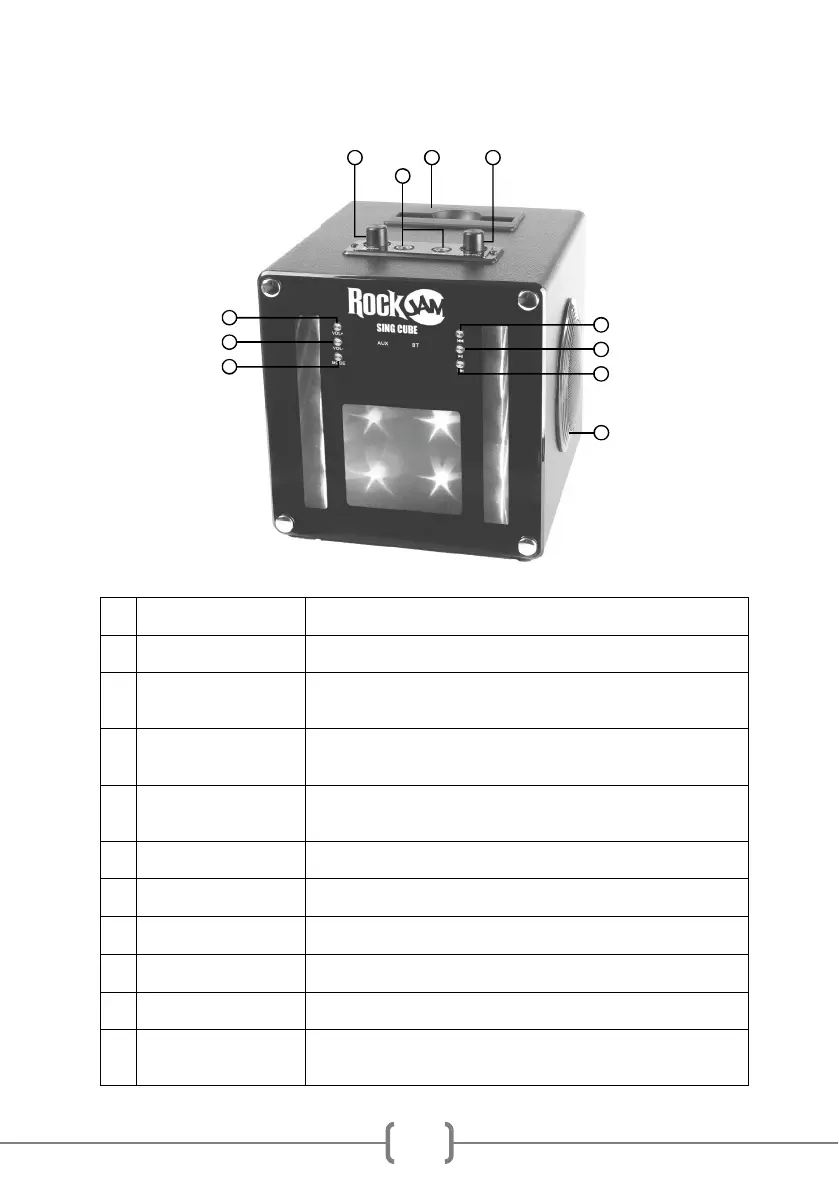
Location of Controls (Front)
1 VOL+ Button Press to increase the audio volume.
2 VOL- Button Press to decrease the audio volume.
3 MODE Button Press to select between Bluetooth and AUX input mode. Press and hold
to switch the lightshow on or off.
4 PREVIOUS Track Button Press to go back to the start of the track. Press twice to select the
previous track. Works in Bluetooth mode only.
5 PLAY/PAUSE Button Press to alternately pause and play the music. In AUX input mode the
music is muted but not paused.
6 NEXT Track Button Press to go to the start of the next track. Works in Bluetooth mode only.
7 Stereo Speakers Stereo 3-inch full range drivers output your music at the best quality.
8 Echo control Adjust the microphone echo control as required for best effect.
9 Mic volume control Adjust the microphone volume as required.
10 Mic input sockets Plug in the microphone or microphones supplied here.
11 Device cradle Place your mobile device here so you can use it to stream karaoke
videos and then sing along.
1
2
3
4
5
6
7
8 9
10
11


 To Next Page