Using the Microphone
You can sing along to any music playing from the speaker using the microphone or
microphones included. Plug the microphone into the microphone sockets on the top of the
speaker and slide the microphone power switch to the on position. Adjust the microphone
volume and echo control as desired. If any howling sound occurs, then stand further away from
the speaker or reduce the music or microphone volume until the howling stops.
NOTE: Do not tap or bang the microphone as this can cause damage to both the microphone
and speaker. Be careful not to twist or strain the microphone cable and do not swing the
microphone by the cable as this will cause irreparable damage.
Troubleshooting Guide
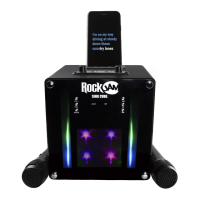
If you encounter any issues while using the SingCube then please check the following before
contacting the retailer or manufacturer for further help:
No power
• The power is not on; make sure the SingCube ON/OFF switch is set to On.
• The SingCube could be completely out of charge. Recharge the SingCube using a USB power
supply and then try again.
No lightshow effect
• The Lightshow is probably just switched off. Press and hold the MODE button to turn on the
lights.
No sound – Bluetooth mode
• Make sure that you are not trying to use Bluetooth while the AUX in cable is connected.
No sound – AUX Input mode
• Make sure the 3.5mm jack cable has been plugged in.


 To Next Page